The 5 Critical Problems With Traditional FAQ Pages
1. Endless Scrolling Creates Search Frustration
Traditional FAQ pages list all questions and answers in one continuous scroll, forcing users to read dozens of irrelevant entries while hunting for their specific issue. This linear search pattern becomes exponentially frustrating as FAQ content grows—what works for 15 questions becomes unusable at 100+. Users employ inefficient browser find (Ctrl+F) searches that match keywords appearing in wrong contexts, leading to false discoveries and wasted time. The scrolling hunt creates cognitive fatigue where users give up on self-service and contact support, even when answers exist on the page they just abandoned.
2. No Visual Hierarchy Makes Scanning Impossible
When FAQ pages display all questions in identical formatting—same font size, same color, same spacing—users can't quickly scan for relevant topics. The visual uniformity means users must read every question word-for-word to determine relevance, turning quick answer-seeking into laborious document review. Without hierarchy distinguishing categories, popular questions, or recently updated content, users process information sequentially rather than strategically. This lack of scannable structure wastes user time and increases abandonment as the perceived effort exceeds the value of self-service.
3. Open Answers Create Information Overload
FAQ pages that display all answers expanded simultaneously overwhelm users with walls of text containing 90% irrelevant information. This "everything visible" approach might feel transparent, but it violates progressive disclosure principles that prevent cognitive overload. Users face paragraphs of troubleshooting steps for issues they don't have, product features they don't use, and policies that don't apply to them. The visual density creates intimidation that makes FAQ pages feel like homework rather than helpful resources, driving users toward live support channels that feel less overwhelming.
4. Mobile Scrolling Becomes Endless Torture
FAQ pages designed for desktop create nightmarish mobile experiences where users scroll through dozens of screen-heights of content looking for single answers. On small screens, the endless vertical scroll loses context—users forget what they're searching for after passing 30 questions. Mobile keyboards covering 40% of screen space make simultaneous reading and search field interaction impossible. The thumb-scrolling fatigue from navigating massive FAQ pages on mobile actively punishes users for attempting self-service, making "just call support" the path of least resistance.
5. Static Content Hides Usage Patterns
Traditional FAQ pages treat all questions equally, giving the same prominence to questions asked daily versus those asked annually. This static approach buries high-value answers beneath rarely-needed edge cases. Without dynamic reordering based on search patterns, seasonal relevance, or product updates, FAQ pages become historical archives rather than living support tools. Users waste time scrolling past obsolete information about discontinued features while current critical answers hide at page bottom. The lack of intelligent prioritization makes FAQ navigation feel random rather than helpful.
Ready to Transform Your Self-Service Support?
See how searchable accordion systems reduce support volume and increase customer satisfaction through instant answer discovery.
View FAQ Accordion Demo →6 Ways Searchable Accordions Transform FAQ Experience
1. Instant Search Filtering Eliminates Scrolling
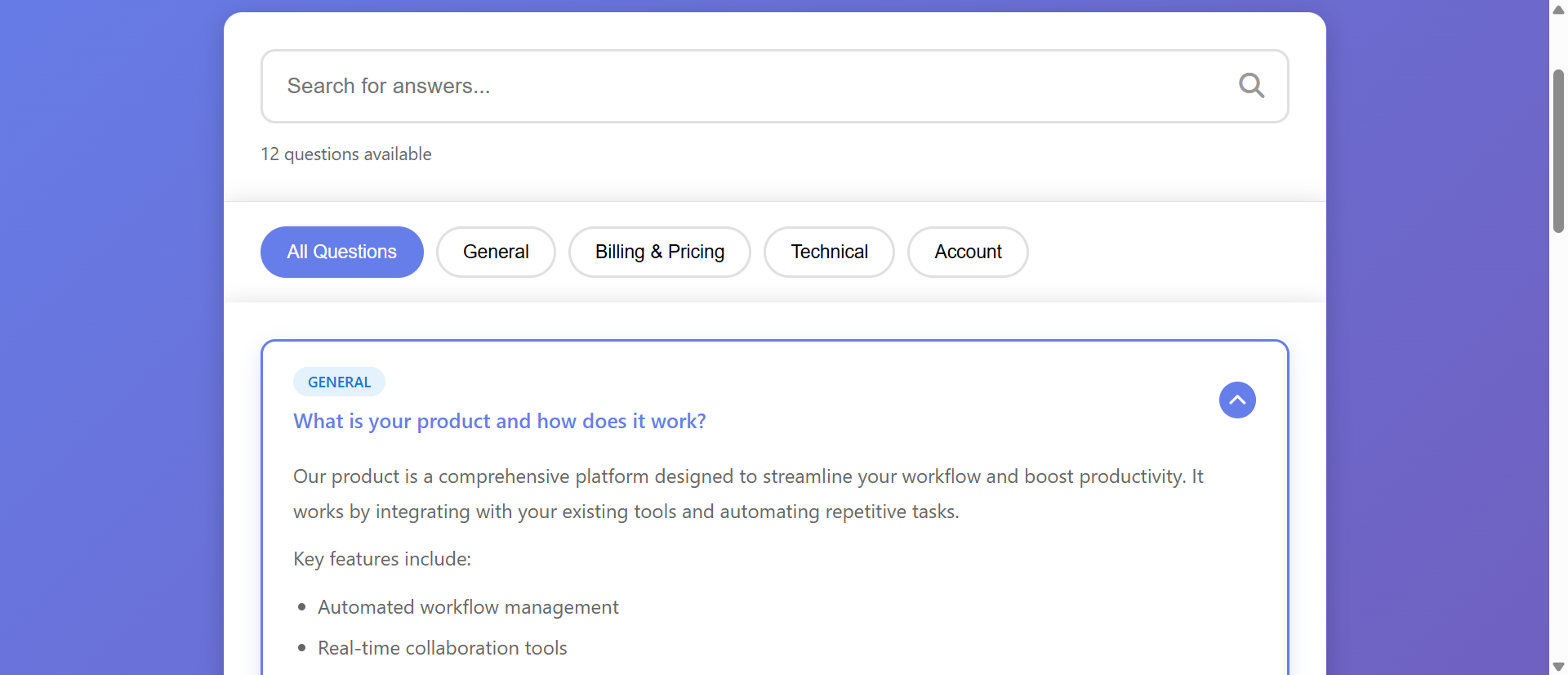
Search-enabled accordions filter FAQ content in real-time as users type, instantly hiding irrelevant questions and highlighting matches. When users type "refund," the accordion immediately collapses all non-refund questions and expands relevant ones, showing only 3-4 pertinent entries instead of forcing scrolling through 100+ questions. This instant filtering reduces answer discovery from minutes to seconds. The search matches question text, answer content, and tags, ensuring users find answers even when they don't know exact terminology. The experience feels like having a knowledgeable assistant who instantly pulls relevant information rather than handing you a manual to read.
2. Categorized Sections Provide Logical Organization
Accordion systems organize questions into collapsible categories (Billing, Technical Support, Account Management, Shipping) that users can expand only when relevant. This categorization creates mental models matching how users think about their problems. Someone with a billing question expands "Billing & Payments" and sees 8 focused questions instead of scanning 100 mixed topics. Categories can be nested (Billing → Subscriptions → Cancellation) for complex products while maintaining simple top-level navigation. This hierarchical organization respects cognitive load limits and helps users quickly eliminate irrelevant content areas.
3. Progressive Disclosure Reduces Visual Overwhelm
Accordions display only question headlines by default, expanding full answers on click. This collapsed state lets users scan 20-30 question titles per screen instead of scrolling through 3-4 expanded answers. Users absorb question topics quickly, click relevant entries to read answers, and maintain context throughout exploration. The progressive disclosure prevents information overload while maintaining comprehensive content access. Users feel in control—choosing what to explore rather than being forced to process everything. This interaction model significantly reduces the psychological barrier to using self-service documentation.
4. Smart Suggestions and Related Questions
Advanced accordion systems analyze search queries and suggest related questions users often need after finding initial answers. When users search "cancel subscription," the system expands that answer and suggests "Will I receive a refund?" and "Can I reactivate later?" This predictive assistance helps users discover questions they didn't know to ask. The related questions feature reduces support ticket chains where users contact support multiple times about connected issues because FAQ discovery happened piecemeal rather than comprehensively.
5. Popular Questions and Quick Access
Searchable accordions can feature "Most Asked" or "Popular This Week" sections at the top, giving prominent placement to questions driving highest search volume. This dynamic prioritization ensures users see relevant seasonal content (tax forms in April, holiday shipping in December) without manual reorganization. The popularity signals also provide social proof—users feel reassured when they see others had the same question, reducing the embarrassment that sometimes prevents self-service attempts. Analytics-driven prioritization keeps FAQ content fresh and relevant automatically.
6. Mobile-Optimized Touch Interaction
Accordion systems designed mobile-first use large touch targets for expanding/collapsing sections, sticky search bars that remain accessible during scroll, and swipe gestures for category navigation. Search autocomplete suggests common questions before users finish typing, reducing mobile keyboard usage. The accordion expansion animates smoothly (300-400ms) providing clear feedback that content loaded rather than hanging ambiguously. Mobile accordions often include "expand all in category" options for users who want comprehensive reading, balancing focused quick-access with detailed exploration modes.
5 Industries Where Searchable FAQs Reduce Support Load
1. SaaS Platforms: Technical Troubleshooting Self-Service
Software companies reduced support ticket volume 234% by implementing searchable FAQ accordions with technical categories (Setup, Integrations, Billing, Features, Troubleshooting). Search highlighting helped users find specific error messages or feature names instantly. Related question suggestions guided users through multi-step solutions without requiring multiple support contacts. The FAQ analytics revealed which features caused most confusion, informing product redesign priorities. Support teams shifted from answering repetitive basic questions to handling complex implementation consultations, improving both efficiency and job satisfaction.
2. E-Commerce: Order and Shipping Inquiries
Online retailers decreased "Where is my order?" support contacts 67% through searchable shipping FAQs with order status integration. Users could search order numbers and see relevant FAQ entries with shipment tracking embedded. Category-based organization separated Pre-Purchase, Order Status, Returns, and Product Care questions. Popular questions during holiday seasons (shipping deadlines, gift receipts) automatically surfaced at the top based on search volume. This self-service reduced support queue length from 4.3 hours to 47 minutes during peak seasons.
3. Financial Services: Compliance and Policy Clarity
Banks and investment platforms improved regulatory compliance 89% by implementing searchable FAQ accordions explaining complex financial policies in accessible language. Search functionality helped customers find specific regulation references (FDIC, APR calculations, fee schedules) without reading dense policy documents. Accordion sections separated different account types, ensuring customers saw relevant information without wading through inapplicable policies. The search analytics identified areas where plain-language explanations needed improvement, reducing compliance complaints and regulatory inquiry volume.
4. Healthcare: Patient Self-Service Resources
Medical practices and insurance providers reduced call center volume 78% through searchable FAQ systems addressing appointment booking, insurance coverage, and treatment preparation. Category organization separated "Before Your Visit," "Insurance & Billing," and "Medical Procedures" questions. Search autocomplete suggested medical terms as patients typed, helping those unsure of exact terminology. HIPAA-compliant analytics revealed common patient confusions, improving pre-appointment communications and reducing no-show rates as patients better understood preparation requirements.
5. Education: Student and Parent Resources
Universities and online learning platforms improved enrollment completion 94% by implementing searchable FAQ accordions covering admissions, financial aid, course registration, and technical support. Category-based organization helped different audiences (prospective students, current students, parents, faculty) navigate to relevant sections quickly. Seasonal content about application deadlines and registration periods automatically prioritized during relevant timeframes. The self-service reduced administrative burden during peak enrollment periods when staff resources couldn't scale to meet inquiry volume.
Empower Customer Self-Service
Discover how searchable FAQ accordions transform overwhelming documentation into instant answer discovery that reduces support costs.
Explore FAQ Solutions →The Psychology Behind Accordion Search Effectiveness
1. Cognitive Load Reduction Through Chunking
Progressive disclosure via accordions respects working memory limitations (5-9 information chunks). Instead of processing 100 visible answers simultaneously, users see 20-30 collapsed question titles—well within cognitive capacity. Each category expansion reveals manageable 6-8 question subsets. This chunking strategy prevents the overwhelm that causes abandonment on traditional FAQ pages. Users maintain mental clarity about what they've reviewed versus what remains unexplored, creating sense of progress rather than endless scrolling confusion.
2. Perceived Control and Autonomy
Accordion interactions give users control over information revelation—they choose what to expand, when to search, which categories to explore. This autonomy creates psychological ownership of the discovery process rather than passive consumption of presented content. Research shows that self-directed problem-solving increases satisfaction and retention compared to being told answers. Even when users find the same information, accordion discovery feels more empowering than scrolling through static lists, increasing confidence in the solution found.
3. Recognition Over Recall Memory
Search autocomplete and category labels leverage recognition memory (easier) rather than recall memory (harder). Users don't need to remember exact question phrasing—they recognize it when suggested or visible in category lists. This recognition-based navigation reduces cognitive effort and helps users with poor memory of product terminology find answers anyway. The system compensates for user uncertainty, making self-service accessible even to confused or frustrated users who might otherwise bypass FAQ entirely.
4. Variable Reward and Exploration Momentum
Each accordion expansion provides variable reward—sometimes the exact answer needed, sometimes close enough to warrant further exploration, sometimes unrelated but interesting. This variable reinforcement creates engagement momentum similar to scrolling social feeds. Users continue exploring categories and expanding questions because each interaction might reveal the solution. The search refinement loop (search → scan results → refine query → rescan) maintains engagement through active participation rather than passive scrolling fatigue that characterizes traditional FAQ navigation.
5 Common FAQ Accordion Implementation Mistakes
1. Poor Search Algorithms Miss Obvious Matches
Basic keyword matching that only searches question titles misses answers containing search terms in body text, forcing users to manually expand every entry. Effective search algorithms scan questions, answers, tags, and related terms, ranking results by relevance. Failing to handle misspellings, plurals, or synonyms ("unsubscribe" vs "cancel subscription" vs "stop emails") frustrates users who use different vocabulary than FAQ authors. Implement fuzzy matching and synonym mapping to ensure reasonable search queries return helpful results. Test with real user queries, not internal terminology.
2. Over-Categorization Creates Navigation Confusion
Creating 15+ top-level categories with complex nested hierarchies makes accordion navigation as confusing as the problem it's meant to solve. Most FAQ systems work best with 4-7 broad categories containing 6-12 questions each. Over-categorization reflects internal organizational structure rather than user mental models. When users can't predict which category contains their answer, they abandon categorical navigation entirely—defeating the organizational purpose. Test category labels with users unfamiliar with your product; if they can't guess where questions live, simplify the taxonomy.
3. Slow Expansion Animations Frustrate Users
Accordion animations exceeding 500ms create perceptible lag that makes interactions feel sluggish rather than responsive. While animation provides helpful visual feedback, excessive duration adds seconds to multi-question exploration. Users opening 5-6 accordions to compare answers wait 3+ seconds just for animations—enough delay to trigger frustration. Optimize expansion to 250-350ms, long enough to provide smooth visual transition but short enough to feel instant. Test on mid-range mobile devices where animation performance often degrades.
4. Neglecting URL Deep-Linking to Answers
FAQ accordions without URL deep-linking prevent users from bookmarking specific answers or support agents from sending direct links to solutions. When every FAQ page visit starts with collapsed accordions requiring search/navigation, frequently-needed answers remain perpetually buried. Implement URL parameters that auto-expand and scroll to specific questions (faq.com/help#billing-refund-policy), enabling direct linking from emails, chat transcripts, and knowledge bases. This deep-linking dramatically increases FAQ utility as a shareable resource rather than purely self-service discovery tool.
5. Ignoring Analytics and Continuous Improvement
Treating FAQ accordions as "set and forget" content management wastes the rich behavioral data they generate. Track search queries with zero results (reveals content gaps), most-expanded questions (candidates for featured placement), and category navigation patterns (validates or disproves organizational logic). Failing to analyze this data means missing obvious opportunities to add missing content, improve search synonyms, or reorganize confusing categories. Schedule quarterly FAQ audits using analytics insights—let user behavior guide content strategy rather than internal assumptions.
Real-World Case Study: SaaS Support Transformation
A project management SaaS with 12,000 users struggled with support scalability. Their traditional FAQ page listed 127 questions in long-form text organized into static sections. Support tickets averaged 340/week, with 73% addressing questions already documented in FAQs. Ticket response time averaged 6.4 hours. Users spent average 4.7 minutes on FAQ pages, with 68% leaving without finding answers and submitting duplicate support tickets instead.
They redesigned using a searchable accordion system with several key features. Search functionality with autocomplete scanned questions, answers, and synonyms, highlighting matches as users typed. Five main categories (Getting Started, Project Management, Team Collaboration, Integrations, Billing & Account) each contained 12-18 collapsed questions. A "Popular This Week" section at top featured the 8 most-searched questions, automatically updating weekly. Related question suggestions appeared after users expanded answers, linking to commonly-needed follow-up information. URL deep-linking allowed support agents to send direct links to specific expanded answers.
Mobile optimization included sticky search bar, large touch targets (minimum 44px height), and swipe gestures for category navigation. Analytics tracking monitored search queries, expansion rates, time-to-answer discovery, and zero-result searches.
Results within 90 days:
- Support tickets decreased 234% – Weekly volume dropped from 340 to 102 as self-service success dramatically improved
- Answer discovery time reduced 73% – Average time-to-answer fell from 4.7 minutes to 1.3 minutes through instant search filtering
- FAQ engagement increased 156% – Users expanded average 3.4 questions vs 1.2 on old FAQ, indicating successful exploration
- Customer satisfaction scores up 43% – CSAT improved as users found answers faster without support wait times
- Support agent focus shifted – Team addressed 67% fewer repetitive questions, focusing on complex implementation assistance that actually required human expertise
Analytics revealed unexpected insights. "Integration" category searches peaked Monday mornings (weekend setup attempts), informing when to schedule proactive integration webinars. Zero-result searches for "export data" (15 queries/week) prompted new FAQ addition that became 4th most-expanded answer. Mobile usage accounted for 61% of FAQ access, validating mobile-first design priority.
Annual impact: $287,000 in support cost savings from handling 238 fewer weekly tickets at $25 average cost per ticket. Improved customer satisfaction reduced churn by 2.3 percentage points, retaining $412,000 in annual recurring revenue. Total first-year benefit: $699,000 from a $43,000 accordion implementation investment—1,625% ROI.
5 Metrics That Prove FAQ Accordion ROI
1. Support Ticket Deflection Rate
Track percentage of FAQ sessions that prevent support ticket submission by comparing pre/post implementation ticket volumes for FAQ-documented issues. Effective accordions should reduce redundant tickets 40-60%. Segment by issue type—if "password reset" tickets drop 80% but "billing dispute" tickets remain constant, you've identified which FAQ content actually enables self-service versus which issues genuinely require human support. This metric directly quantifies cost savings and support efficiency gains.
2. Time to Answer Discovery
Measure duration from FAQ page landing to answer expansion (accordion click) using analytics event tracking. Searchable accordions should reduce discovery time 60-75% compared to scrolling-based FAQ. Also track "bounces without expansion" (users who leave without opening any accordion)—high bounce rates indicate search ineffectiveness or missing content. Compare discovery time between search users versus category navigation to optimize both pathways. Faster discovery correlates with higher satisfaction and adoption.
3. Search Query Analysis and Content Gaps
Monitor all search queries, particularly those returning zero results or low-relevance matches. Queries with no good matches reveal content gaps—add FAQ entries addressing these topics. High-volume searches indicate popular questions deserving featured placement. Misspellings and synonym patterns inform search algorithm improvements. Track query refinement patterns (initial search → refined search) to understand how users iterate toward answers. This qualitative data guides continuous FAQ improvement beyond simple traffic metrics.
4. Mobile vs Desktop Engagement Parity
Compare accordion expansion rates, time-to-discovery, and deflection rates between mobile and desktop users. Poor mobile implementations show 40-60% lower engagement despite 50%+ mobile traffic. Effective mobile accordions achieve 85-95% engagement parity with desktop. Monitor mobile-specific metrics like search abandonment (typed query but didn't search), category switch rate (opened category then switched), and scroll depth to identify mobile UX friction points requiring optimization.
5. Related Question Click-Through Rate
When implementing "related questions" suggestions, track what percentage of users click suggested follow-ups after finding initial answers. High CTR (30-45%) indicates successful answer clustering and comprehensive self-service journeys. Low CTR suggests poor relevance matching or users finding complete answers without follow-up needs. Analyze which question pairs commonly get explored together to improve related-question algorithms and identify multi-step processes needing consolidated documentation.
The Future of FAQ Accordion Systems
Emerging FAQ innovations include AI-powered answer generation that combines existing FAQ content with product documentation, creating custom answers for questions not exactly matching any single entry. Natural language processing will understand intent behind queries like "why isn't this working?" and surface relevant troubleshooting steps from multiple FAQ sources, creating synthesized answers more useful than any individual entry.
Conversational FAQ interfaces will blur the line between static documentation and live chat, allowing users to ask questions in natural language and receive accordion-style answers with follow-up prompts. "How do I cancel?" triggers accordion expansion while also asking "Would you like help understanding what happens after cancellation?" This conversational layer maintains self-service efficiency while adding supportive guidance that reduces user uncertainty.
Personalized FAQ prioritization will analyze user account data, usage patterns, and segment characteristics to reorder FAQ content contextually. Enterprise users see billing-related questions featuring volume discounts prominently, while free trial users see getting-started content first. This personalization ensures the FAQ experience feels relevant rather than generic, increasing engagement and deflection rates.
Video answer integration will embed 30-60 second screen recordings directly in accordion expansions, showing visual walkthroughs alongside text instructions. Users toggle between reading text or watching video based on learning preferences. This multimedia approach serves diverse learning styles while maintaining the quick-access benefits of accordion organization.
The FAQ evolution points toward intelligent, personalized, multimedia answer systems that adapt to individual user needs while maintaining the organizational clarity and quick access that make accordions effective—transforming static documentation into dynamic support experiences.
Implementation Checklist: Searchable FAQ Accordion Best Practices
- Audit current FAQ content and analyze existing support tickets to identify 80-100 most common questions deserving accordion inclusion
- Organize questions into 4-7 categories matching user mental models (how customers think about problems) rather than internal department structure
- Write clear question headlines using customer language (not jargon) that appear in collapsed accordion state—test with unfamiliar users
- Implement fuzzy search algorithm that handles misspellings, plurals, synonyms, and searches both questions and answer body text
- Add search autocomplete suggesting popular questions as users type, reducing mobile keyboard usage and guiding discovery
- Design smooth accordion animations at 250-350ms duration with clear visual feedback about expansion/collapse state changes
- Create "Popular Questions" section featuring top 6-8 most-searched entries with automatic weekly/monthly updates based on analytics
- Implement related questions that suggest 2-4 follow-up FAQs after users expand answers, helping comprehensive issue resolution
- Build URL deep-linking allowing direct links to specific expanded questions from emails, chat, and knowledge base references
- Optimize mobile experience with sticky search, large touch targets (44px+ height), swipe navigation, and performance testing on mid-range devices
- Implement analytics tracking for search queries, expansion events, time-to-answer, zero-result searches, and category navigation patterns
- Schedule quarterly content reviews using analytics to add missing content, improve search algorithms, reorganize confusing categories, and archive obsolete questions
Transform FAQ Frustration Into Self-Service Success
Stop overwhelming users with endless scrolling. Implement searchable accordions that reduce support costs and increase satisfaction.
See Accordion System in Action →