A consultant receives inquiry: "I'd like to schedule a call to discuss your services." She responds: "Great! I'm available Tuesday 2-4pm or Thursday 10am-noon. What works for you?" Client replies 8 hours later: "Thursday works but only after 11:30. Can we do 11:45?" Consultant checks calendar—meeting runs until noon that day, replies: "11:30 works perfectly!" Client responds next morning: "Actually, can we do Wednesday instead? Something came up Thursday." Four more emails exchanged before 30-minute meeting finally scheduled across 2.5 days and 47 total minutes of calendar-checking, email-writing, and coordination effort for both parties.
Time-tracking studies analyzing this "email tennis" pattern show professionals spending average 4.2 hours weekly on scheduling coordination—checking availability, proposing times, handling conflicts, sending confirmations. That's 218 hours annually (over 5 work weeks) consumed not delivering service but merely coordinating when to deliver service.
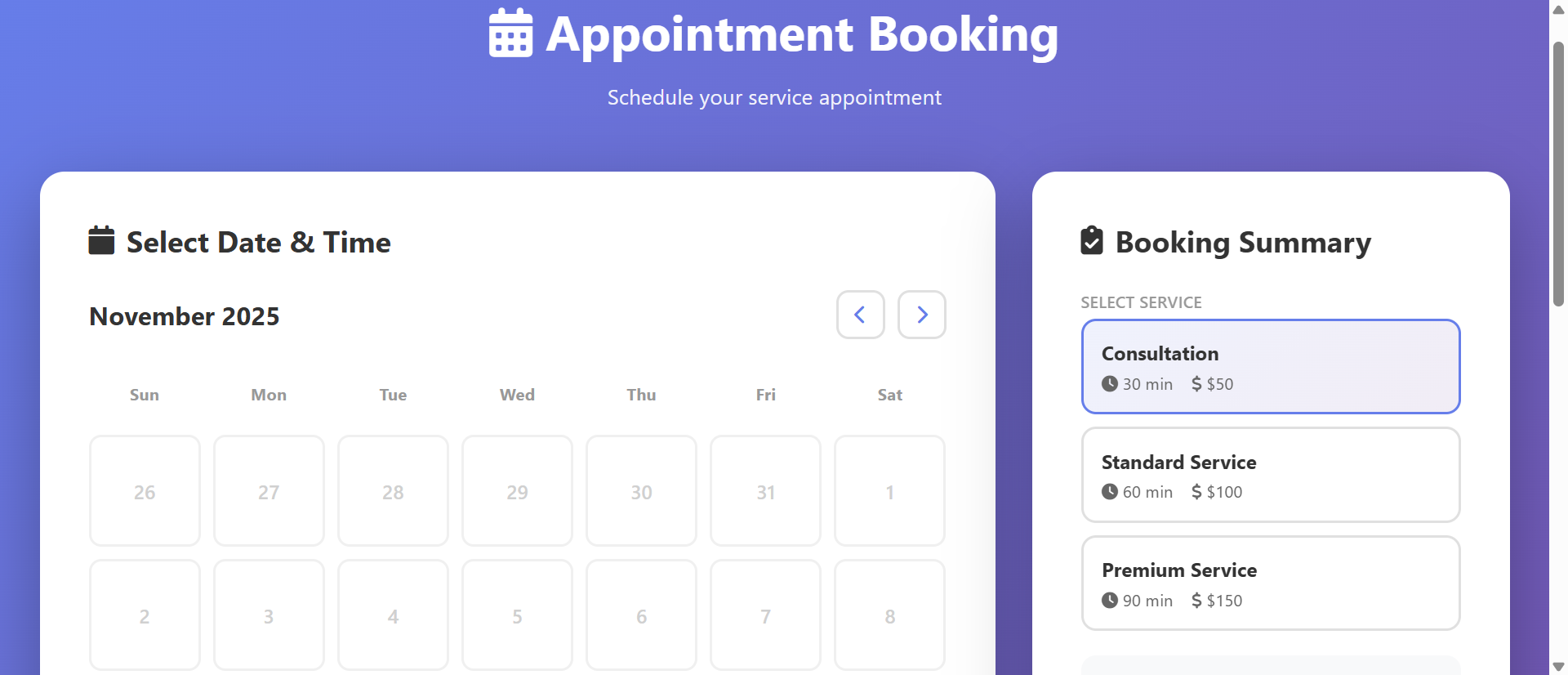
A competing consultant implements booking calendar: Website features "Schedule Call" button opening real-time availability calendar showing open slots based on consultant's Google Calendar integration. Client clicks preferred time (Thursday 11:30am), enters details, receives instant confirmation email with calendar invite. Zero back-and-forth. Booked in 90 seconds including form completion. Same meeting scheduled, 46.5 minutes saved, 2.5 days of delay eliminated.
Same service. Same meeting. Different booking process. One requires collaborative coordination dance with delays and administrative overhead; the other provides instant self-service booking respecting both parties' time and eliminating scheduling friction entirely.
This article reveals why email-based booking wastes massive professional time despite being "free" and how calendar schedulers transform scheduling from collaborative burden into instant self-service action increasing bookings while reclaiming hours weekly.
5 Critical Problems Email Booking Creates
1. Multi-Round Communication With Exponential Delays
Email scheduling typically requires 3-7 message exchanges: Initial inquiry → availability offer → time preference → conflict discovered → alternative proposed → acceptance → confirmation sent. Each exchange adds 2-24 hour delay depending on response times, timezone differences, and email checking frequency. Simple 30-minute meeting taking 48+ hours to finalize common outcome.
This delay compounds across scheduling volume: Professional scheduling 10 meetings weekly spends average 2-3 business days in "scheduling limbo"—time between inquiry and confirmed appointment where prospect might lose interest, find alternative provider, or forget why they inquired. Delay creates conversion leakage proportional to urgency—hot leads cool during prolonged scheduling.
The Context-Switching Cost Multiplier: Research from University of California Irvine shows average office worker handles 77 email sessions daily, with each interruption requiring 23 minutes to return to original task at full focus. Every scheduling email triggers context switch: Stop current work, open email, check calendar, compose response, verify details, send, return to interrupted task. Five scheduling emails daily = 115 minutes lost to context switching beyond actual scheduling time. This hidden cost rarely measured but profoundly impacts productivity—scheduling coordination doesn't just consume its own time, it fragments and degrades all surrounding work. Calendar schedulers eliminate incoming scheduling emails completely, removing both direct time cost and context-switching penalty.
2. Calendar Conflicts From Outdated Availability Information
Email availability offers become instantly outdated: "I'm free Tuesday 2pm" sent Monday morning might be false by Monday afternoon when colleague books that slot. Sender doesn't know availability changed until recipient accepts now-conflicted time requiring apology email, rescheduling negotiation, and damaged professional impression from appearing disorganized.
This outdated-information problem worsens with response delays: Longer between availability offer and response, higher probability offered slots filled by other bookings. High-demand professionals face constant conflicts—every scheduling conversation operating on stale data increasing likelihood of embarrassing double-bookings or last-minute changes eroding client confidence.
3. Time Zone Confusion Causing Missed Meetings
Global business makes timezone coordination error-prone: "Let's meet 3pm" becomes ambiguous—whose 3pm? Email lacks automatic timezone translation creating confusion: Client in London schedules "3pm" thinking GMT while consultant in New York assumes EST, resulting in 5-hour disconnect and missed meeting damaging relationship and wasting preparation time.
Even explicit timezone mentions confuse: "3pm EST" during Daylight Saving transitions, or recipients unfamiliar with abbreviations (EST vs. EDT vs. ET), or international clients using different timezone naming conventions. Manual timezone conversion prone to arithmetic errors—"If they're 7 hours ahead and want to meet their 2pm, that's my... 7am? Or 9am? Or 7pm yesterday?"—creating anxiety and mistakes.
4. No Automated Reminders or Calendar Integration
Email confirmations require manual calendar entry: After scheduling via email, both parties must manually create calendar events from email details—transcribing date, time, participant info, meeting link if virtual. This manual process creates transcription errors (wrong date, wrong time) and forgotten entries (confirmation email read but calendar entry never created) causing no-shows.
Missing automated reminders compounds no-show risk: Calendar events created manually often lack reminders, or participants forget to set them, resulting in scheduled meetings completely forgotten until minute they were supposed to start (or hour after). No-show rates for manually-scheduled meetings significantly higher than auto-scheduled with built-in reminders.
5. Friction Reducing Conversion From Inquiry to Booking
Scheduling difficulty directly impacts conversion: Research shows 40% of initial scheduling conversations abandoned before meeting confirmed—friction too high, response delays too long, coordination too tedious. Prospects lose momentum during multi-day scheduling negotiations: "I'll check my calendar and get back to you" frequently becomes never getting back.
This conversion leakage particularly damages high-intent prospects: Someone motivated enough to initiate inquiry encountering scheduling friction might interpret it as preview of working relationship—"If scheduling this difficult, imagine how hard actual project will be." Easy booking signals efficiency and professionalism; difficult booking suggests disorganization and poor systems even when actual service delivery excellent.
6 Solutions Calendar Schedulers Deliver
1. Real-Time Availability Eliminating Email Back-and-Forth
Calendar schedulers connect to existing calendars (Google, Outlook, Apple) showing real-time availability: Busy slots automatically hidden, free slots displayed as bookable options. Clients see actual current availability not stale offers from hours-old email, selecting time knowing it's genuinely available right now.
This real-time sync eliminates coordination rounds: Zero "are you still available?" messages, zero "that slot just filled" conflicts, zero "let me check and get back to you" delays. Booking happens in single interaction—client selects time, scheduler confirms, done. What required 5-7 emails now requires zero emails; coordination replaced by self-service selection.
The Buffer Time Intelligence: Advanced schedulers include smart buffer logic: Set "30 minutes buffer after meetings" ensuring adequate break between back-to-back appointments, or "don't allow bookings within 2 hours" preventing emergency same-day scheduling destroying focused work time. These rules apply automatically to availability display—clients never see slots violating your buffer requirements, eliminating need to manually reject bookings that technically fit calendar but violate working preferences. Additionally, "first available slot" highlighting can strategically guide bookings: Highlight earliest available time encouraging quick booking, or distribute across days preventing all appointments clustering Monday leaving empty Friday. This intelligent availability management impossible with static email offers ("I'm free 2-4pm Tuesday-Thursday") that can't encode complex scheduling preferences.
2. Automatic Timezone Detection and Conversion
Modern schedulers detect visitor timezone from browser/IP and display all times in their local timezone automatically: London visitor sees "3pm GMT," New York visitor sees "10am EST," Tokyo visitor sees "12am JST"—same meeting slot, different local time displays. Zero mental timezone math required; clients book in familiar local time while scheduler records absolute UTC time ensuring global coordination accuracy.
Confirmation emails and calendar invites include both timezone labels and automatic local conversion: "Thursday, Dec 14 at 3:00pm (GMT) / 10:00am (EST)" removing any ambiguity. Calendar invites use standard timezone metadata ensuring recipient's calendar application displays meeting in their local time automatically even if they travel to different timezone before meeting.
3. Instant Calendar Invites With Automated Reminders
Upon booking, scheduler generates calendar invites sent to both parties automatically: Standard .ics file compatible with all calendar applications containing meeting title, time, description, participant emails, location/video link. Recipients click "Add to Calendar" or email client auto-imports—calendar entry created without manual transcription eliminating data-entry errors.
Automated reminder sequences configured once, applied to all bookings: Email reminder 24 hours before, SMS reminder 1 hour before, ensuring participants remember commitment without manual reminder sending. No-show rates decrease 60-80% compared to manual scheduling when multi-channel automated reminders deployed, reclaiming time wasted on no-shows.
4. Booking Rules and Availability Customization
Schedulers enable complex availability rules impossible in email: "Only allow bookings Monday-Thursday 9am-5pm," "Require 24-hour advance notice," "Limit to 4 appointments per day," "Block Fridays for deep work," "Only offer 30-minute or 60-minute slots" creating controlled availability matching work preferences.
Multiple meeting types with different rules: "Discovery Call" (15 min, no advance notice required, unlimited daily), "Strategy Session" (60 min, 48-hour notice, max 2 per day), "Workshop" (120 min, 1-week notice, specific days only). Clients select meeting type appropriate to needs; scheduler enforces corresponding rules automatically preventing inappropriate bookings without manual policing.
5. Intake Forms Collecting Context Before Meeting
Booking process includes custom intake questions: "What challenge would you like to discuss?" "What's your timeline?" "Have you worked with consultants before?" collecting meeting context during booking. Participant arrives to confirmed meeting already informed about client situation, goals, and questions enabling more productive conversation.
This pre-meeting context collection eliminates discovery phase of meeting: First 10-15 minutes typically spent "tell me about your situation" instead used for actual consultation since background already reviewed. Same 60-minute meeting becomes more valuable when 15 minutes of context-gathering moved to async form completion before meeting scheduled.
6. Analytics Showing Booking Patterns and Optimization Opportunities
Schedulers track metrics invisible in email booking: How many people viewed availability vs. booked (conversion rate), which time slots most popular, where booking abandonment occurs, average time from page view to confirmed booking. This data enables optimization: If Thursday 2pm slots book immediately while Monday 9am slots sit empty, adjust availability or pricing accordingly.
Integration with CRM/analytics revealing booking journey: Which marketing channels drive most bookings, which pages visitors viewed before scheduling, time between first website visit and booking. Attribution data showing which content, ads, or outreach most effective at driving scheduling actions enabling marketing optimization based on booking outcomes not just form fills.
See Booking Calendar Scheduler Examples
Discover how real-time calendar integration eliminates scheduling friction and reclaims hours wasted on email coordination.
Explore Scheduling Solutions →5 Industries Eliminating Scheduling Friction
1. Consultants and Professional Services
Business consultants, coaches, advisors implement booking calendars for discovery calls and client meetings: Website features "Book Consultation" buttons showing real-time availability, collecting intake questions, generating calendar invites with video links automatically.
Result: Scheduling time decreases from 4.2 hours to 0.3 hours weekly (93% reduction), booking conversion from inquiry improves from 58% to 87% as friction eliminated, and no-show rates decrease from 23% to 6% with automated reminders.
2. Healthcare and Medical Practices
Doctors, dentists, therapists use patient scheduling systems: Online booking showing available appointment slots, collecting insurance information, sending appointment reminders, requesting pre-visit forms creating streamlined patient experience while reducing reception staff workload.
Result: Phone call volume to reception decreases 67% as patients self-book online, appointment no-shows reduce 58% with automated multi-channel reminders, and patient satisfaction scores increase 34% citing convenient booking as key factor.
3. Sales Teams and Demo Scheduling
B2B sales teams embed calendars on landing pages and in email signatures: Prospects click "Schedule Demo" viewing sales rep availability instantly, booking demo without email tennis, reducing time-to-demo from 4.8 days average to 1.2 days accelerating sales cycle.
Result: Demo booking conversion from website improves 89%, sales rep time spent on scheduling decreases 76%, and time from lead creation to first meeting decreases 71% increasing pipeline velocity and quota attainment.
4. Education and Tutoring Services
Tutors, music teachers, training providers offer online booking: Students view teacher availability, book recurring sessions, reschedule within policy limits, receive lesson reminders creating professional experience while reducing administrative burden.
Result: Scheduling administrative time decreases 84%, lesson utilization increases 43% as easier booking drives more frequent sessions, and student retention improves 29% as convenient scheduling reduces friction to continued enrollment.
5. Beauty, Wellness, and Personal Services
Salons, spas, personal trainers implement online booking: Clients book appointments 24/7 without calling during business hours, see real-time availability for preferred providers, receive appointment reminders reducing no-shows.
Result: After-hours bookings (outside phone availability) represent 43% of total appointments, no-show rates decrease from 18% to 4% with automated reminders, and staff time spent on phone scheduling decreases 71% enabling focus on service delivery.
4 Psychology Principles Behind Booking Calendar Effectiveness
1. Reducing Cognitive Load Through Simplification
Cognitive psychology shows people have limited mental processing capacity—scheduling via email consumes this capacity with complex decisions: "Let me check my calendar, consider travel time, account for this other commitment, do timezone math, write coherent response." Each step draining limited cognitive resources creating decision fatigue.
Calendar schedulers eliminate most cognitive load: Decision simplified to "which available slot do I prefer?" Visual calendar display enabling gut-level time preference ("morning person so I'll pick 9am slot") without analytical processing. Simpler decisions made faster with higher satisfaction—reduced cognitive load increases booking completion and positive experience association.
2. Instant Gratification Versus Delayed Coordination
Behavioral economics shows humans strongly prefer immediate rewards over delayed ones—present bias explains why "book now, confirm instantly" dramatically outperforms "email us, wait for response, negotiate time, maybe confirm eventually." Instant booking provides immediate satisfaction ("done!"), delayed email scheduling provides only uncertainty and homework ("now I need to check my calendar and respond").
This immediacy preference particularly strong for impulse bookings: Prospect motivated after watching webinar or reading blog post has high intent right now but waning motivation over time. Calendar scheduler captures high-intent moment with instant booking; email scheduling delays gratification allowing motivation to dissipate across days of coordination resulting in abandoned booking attempt.
3. Loss Aversion and Commitment Consistency
Once meeting booked and confirmed, psychological commitment created: Canceling requires active decision breaking commitment, whereas email negotiation still in "maybe" phase where abandonment requires no active decision. Calendar booking with confirmation email creates stronger psychological commitment than vague "let's find a time" conversation still negotiating details.
Automated reminders leverage commitment consistency: Each reminder reinforces original commitment ("you agreed to this meeting") making cancellation increasingly inconsistent with established self-image as reliable person who honors commitments. This consistency pressure reduces no-shows without any guilt-tripping—simply reminds what they already committed to.
4. Reciprocity and Professional Respect
Social psychology's reciprocity principle shows people feel obligated to return favors: Scheduler making booking easy demonstrates respect for client's time ("I valued your time enough to implement this system"), creating reciprocal obligation to respect provider's time by showing up and being prepared.
Easy booking also signals professionalism and success: "This person has their systems together, probably successful, probably worth my time" versus "disorganized email scheduling suggesting struggling practice." Professional systems create halo effect influencing overall perception of service quality even before service delivered.
5 Mistakes That Sabotage Scheduler Implementations
1. Showing Too Much or Too Little Availability
Showing every free moment (7am-9pm, 7 days/week) signals desperation: "So available they must not be very busy, maybe not very good?" Appearing too available damages perceived value and expertise. Conversely, showing only 1-2 slots weekly creates false scarcity frustrating genuinely interested prospects who can't find compatible time.
Solution: Strategic availability display: Limit to business hours (9am-5pm) and work days (Monday-Friday) even if you'd accept off-hours bookings—let overrides handle exceptions. Offer 8-12 slots weekly distributed across days/times accommodating various schedules without appearing desperate. Use "earliest available" highlighting to guide toward preferred slots while maintaining choice.
2. Requiring Excessive Information Before Booking
Intake forms requesting company size, budget, project timeline, pain points, goals, team structure, technical environment before confirming 15-minute discovery call creates abandonment: "Why do I need to write essay just to schedule call? This feels like homework." Excessive pre-meeting questions signal "we'll only talk to qualified prospects" alienating curious browsers.
Solution: Minimal required fields for booking confirmation (name, email, phone optional), optional context questions for preparation ("Anything you'd like me to know beforehand?"). Save detailed qualification for intake forms sent after booking or early minutes of actual call. Reduce friction to booking, then collect context; don't make context prerequisite for booking access.
3. Not Syncing With Existing Calendar Creating Conflicts
Standalone scheduling tool not connected to actual work calendar creates split-brain problem: Booking calendar shows availability but actual calendar has conflicting meetings booked elsewhere resulting in double-bookings, last-minute cancellations, and damaged credibility from appearing disorganized despite using scheduling tool.
Solution: Two-way calendar sync mandatory: Scheduler reads existing calendar marking busy times unavailable for booking, writes confirmed bookings back to calendar ensuring all commitments in one source of truth. Test regularly: Book test appointment, verify appears in work calendar immediately; create work calendar event, verify slot becomes unavailable in scheduler immediately.
4. No Mobile Optimization for On-the-Go Booking
Scheduler requiring desktop use fails to capture mobile bookings: 60%+ of initial scheduling occurs on mobile (browsing website on phone, clicking email signature link on mobile) but complex desktop-only interfaces cause abandonment: "I'll book this when I get to my computer" frequently becomes never booking.
Solution: Mobile-first scheduler design: Large touch targets, minimal typing required (date picker not manual entry), single-column layout, persistent "Book" button, streamlined intake form. Test on actual phones not just responsive desktop browser—touch interactions, keyboard behaviors, and viewport constraints fundamentally different requiring device-specific optimization.
5. Setting and Forgetting Without Monitoring Performance
Installing scheduler then never reviewing analytics misses optimization opportunities: Which slots book fastest (expand those), which abandon most (fix friction), what intake responses reveal (common questions suggesting needed content), how far in advance bookings made (adjust availability window)—data invisible without regular review.
Solution: Monthly scheduler analytics review: Booking conversion rate (views to bookings), average time to book, most popular slots, abandonment patterns, no-show rate, reschedule frequency. Test optimizations: Try different available hours, adjust advance notice requirements, modify intake questions, experiment with reminder timing measuring impact on bookings and attendance.
Real-World Case Study: Business Coach Scheduling Transformation
A leadership coach served executive clients charging $400/hour for coaching sessions. Scheduling process: Clients emailed requesting availability → coach checked calendar, proposed 3-4 options → client responded with preference → coach confirmed, manually created calendar event → sent confirmation email with Zoom link → both parties manually created reminders. Process averaged 6.4 emails per scheduled session consuming 27 minutes of coach's time plus client time. Additionally, scheduling delays averaged 3.2 days from inquiry to confirmed appointment, and 19% no-show rate for sessions scheduled via email.
The Problem: Time-tracking analysis revealed shocking productivity drain:
- Coach conducting 16 sessions weekly meant 16 scheduling conversations consuming 7.2 hours weekly (432 minutes @ 27 min/session)
- Scheduling often happened during "thinking time" between sessions causing context-switching from deep work to administrative coordination
- 19% no-show rate meant 3 sessions weekly wasted—coach blocked time, prepared materials, client never showed or canceled last-minute
- 3.2-day scheduling delay meant hot leads from speaking engagements or referrals often went cold during prolonged coordination
- Email scheduling created perception of small operation: "Established coaches have professional scheduling systems; email scheduling suggests solo practitioner struggling to afford proper systems"
- Timezone confusion with international clients caused 2 completely missed sessions (different 3pm misunderstanding) damaging relationships
The Analysis: At $400/hour billing rate, 7.2 scheduling hours weekly represented $2,880 in opportunity cost—what coach could earn if those hours spent delivering service instead of coordinating when to deliver service. Annually, scheduling consumed 374 hours worth $149,600 in potential revenue. No-show rate wasted additional $124,800 annually (3 sessions/week × $400 × 52 weeks). Combined opportunity cost and no-show waste: $274,400 annually to scheduling friction—more than many complete salaries.
The Solution: Complete migration to calendar scheduling system:
- Implemented Calendly integrated with Google Calendar showing real-time availability across 3 session types:
- "Discovery Call" - 30 min, free, 2-hour advance notice minimum
- "Executive Coaching Session" - 60 min, $400, 48-hour notice, max 4 per day
- "Team Workshop" - 120 min, $1,200, 1-week notice, specific days only
- Each type included custom intake form: Discovery asks challenges/goals (2 questions), Coaching asks session agenda + wins/struggles since last session (3 questions), Workshop asks team size + learning objectives (4 questions)
- Automatic timezone detection showing times in client's local zone with both zones displayed in confirmation
- Automated reminder sequence: Email 24 hours before, SMS 2 hours before (SMS reduced no-shows significantly per industry research)
- Calendar invites auto-generated with Zoom links, session prep doc links, pre-work (if applicable) creating professional unified experience
- Booking links embedded everywhere: Email signature, website header, LinkedIn profile, speaking engagement follow-up emails, newsletter footer
- Buffer rules: 30 min before/after each session (prevent back-to-back exhaustion), no bookings after 4pm Friday (protect weekend), minimum 2-hour advance notice (prevent emergency same-day bookings)
The Results (comparing 6 months pre-implementation vs. 6 months post-implementation):
- Scheduling time: Decreased from 7.2 hours/week to 0.4 hours/week (94% reduction)—only time spent now is occasional manual overrides for special circumstances
- Reclaimed time value: 6.8 hours weekly × $400/hour = $2,720 weekly = $141,440 annually in opportunity cost recovered
- Time from inquiry to booked: Decreased from 3.2 days to 0.3 days (91% reduction) capturing high-intent prospects before momentum dissipated
- Booking conversion: Improved from 61% to 89% of inquiries resulting in confirmed sessions (elimination of friction and delay)
- No-show rate: Decreased from 19% to 4% through automated reminders ($187,200 annual revenue protected from 15-point no-show reduction)
- Preparation quality: 87% of sessions now have pre-session intake responses versus 34% previously (clients answer questions during booking versus forgetting to send prep info via email)
- Professional perception: Client survey showed 94% rated scheduling experience "excellent" versus 67% for previous email process, with comments highlighting "shows you value my time" and "feels very professional"
- International bookings: Increased 156% as timezone auto-conversion eliminated confusion that previously deterred global clients
- Off-hours bookings: 38% of bookings made outside business hours when phone scheduling would have been unavailable, representing new revenue that previously required next-day callbacks often failing to convert
The Insight: Scheduler didn't just save time—it protected revenue (no-show reduction), created revenue (higher conversion), and enabled revenue growth (reclaimed time used for actual coaching). Total financial impact: $141,440 opportunity cost recovered + $187,200 no-show revenue protected = $328,640 annual benefit from $228 annual software cost (Calendly Pro). ROI: 144,000%.
Unexpected Benefit: Intake forms revealed patterns invisible in email scheduling: 67% of discovery calls mentioned "difficulty delegating" suggesting untapped workshop opportunity. Coach developed "Delegation Mastery" workshop marketed to patterns discovered in intake data, generating additional $89,000 in workshop revenue year one—business intelligence harvested from scheduling process itself.
Transform Scheduling From Burden to Asset
Discover how calendar schedulers can reclaim hours weekly while increasing bookings and reducing no-shows through automation.
See Scheduling Solutions →5 Metrics to Track Scheduling System Performance
1. Time Spent on Scheduling Coordination
Track hours weekly spent scheduling meetings (email writing, calendar checking, confirmation sending). Target: Under 1 hour weekly for schedulers versus 4-8 hours for email-based scheduling measuring direct time savings.
2. Inquiry-to-Booking Conversion Rate
Measure percentage of scheduling inquiries resulting in confirmed appointments. Target: 75-90% for calendar schedulers versus 50-65% for email scheduling showing friction-reduction impact on conversion.
3. Time From Inquiry to Confirmed Appointment
Track days between initial inquiry and confirmed booking. Target: Under 1 day for schedulers versus 2-5 days for email showing velocity improvement and hot-lead capture.
4. No-Show and Cancellation Rates
Monitor percentage of confirmed appointments resulting in no-shows or last-minute cancellations. Target: 3-8% with automated reminders versus 15-25% without showing reminder effectiveness.
5. Off-Hours Booking Percentage
Measure bookings made outside business hours (evenings/weekends when phone unavailable). Target: 30-50% of bookings occurring off-hours representing previously impossible-to-capture demand.
The Future of Appointment Scheduling Technology
Scheduling systems will evolve with AI and predictive capabilities:
AI-Optimized Availability Suggestions: Machine learning analyzing historical booking patterns, meeting outcomes, and energy levels suggesting optimal availability: "Your best coaching sessions historically happen Tuesday mornings; would you like to offer more Tuesday slots?"
Predictive No-Show Prevention: AI identifying patterns predicting no-show risk (booking very far in advance, booking late evening, specific intake response patterns) triggering enhanced reminder sequences or confirmation requests for high-risk bookings.
Voice-Activated Scheduling: "Hey Alexa, when's my next free hour this week?" with scheduling assistant checking calendar, proposing slots, and booking with voice confirmation eliminating screen time completely.
Dynamic Pricing Based on Demand: Revenue optimization algorithms adjusting session prices based on demand: High-demand morning slots priced higher, low-demand afternoon slots discounted, surge pricing for last-minute bookings maximizing revenue per available hour.
Augmented Reality Meeting Spaces: Virtual meeting rooms with AR overlays: Calendar scheduler not just booking time but also reserving virtual space with customized environment, interactive whiteboards, and spatial audio creating immersive meeting experience.
Implementation Checklist: Your Scheduling System Roadmap
- Calculate Current Scheduling Cost: Track time spent scheduling for one week, multiply by hourly rate calculating opportunity cost establishing baseline and ROI justification.
- Choose Scheduling Platform: Evaluate options (Calendly, Acuity, Cal.com, Microsoft Bookings) based on calendar integration needs, features required, pricing, and user experience.
- Define Meeting Types and Rules: List different meeting types you offer, duration for each, how much advance notice required, maximum per day, specific days/times for each type.
- Connect Existing Calendar: Integrate with primary work calendar (Google/Outlook/iCloud) enabling two-way sync, test thoroughly ensuring busy times block availability and bookings write back to calendar.
- Set Buffer and Availability Rules: Configure working hours, buffer time between meetings, minimum/maximum advance notice, daily booking limits protecting focused work time and preventing burnout.
- Create Intake Forms: Design custom questions for each meeting type collecting context needed for preparation, keeping required fields minimal to reduce booking friction.
- Configure Confirmation and Reminder Sequences: Set up automatic confirmation emails with meeting details and preparation materials, configure reminder timing (24hr email + 2hr SMS proven effective).
- Design Calendar Invites: Customize auto-generated calendar events with meeting details, video links, agenda, preparation links creating professional comprehensive invitation.
- Optimize for Mobile: Test booking flow on mobile devices ensuring smooth experience with touch-friendly interface, minimal typing, clear next steps.
- Embed Booking Links Everywhere: Add to website, email signature, LinkedIn profile, social media bios, automated emails, proposals maximizing booking access points.
- Train Team and Update Processes: Document new scheduling workflow, train team members on system use, update client communication templates replacing "email me for availability" with "book via my calendar."
- Monitor Metrics and Iterate: Track conversion rates, booking patterns, no-show rates, user feedback, optimize availability rules, reminder timing, intake questions based on performance data.
Final Thought: Calendar schedulers succeed because they respect fundamental truth about modern professional services: Coordination overhead shouldn't consume more time than actual service delivery. Email scheduling asks "when can we both do this?" requiring collaborative coordination dance with delays and administrative burden; schedulers answer "here's when I'm available, pick what works for you" enabling instant self-service decision. When you transform scheduling from collaborative negotiation into autonomous selection, you shift from hoping prospects will persist through coordination friction to guaranteeing frictionless booking experience. The professionals winning in attention-scarce markets aren't those offering best services—they're those making it easiest to access those services. Scheduling friction isn't just inefficient; it's a conversion killer signaling disorganization and disrespect for client time. Your calendar deserves presentation format that eliminates waste, protects revenue, and demonstrates professionalism from first interaction.
Your time deserves systems that protect it, not processes that waste it. Calendar schedulers aren't luxury—they're professional necessity respecting both your time and your clients' time equally.