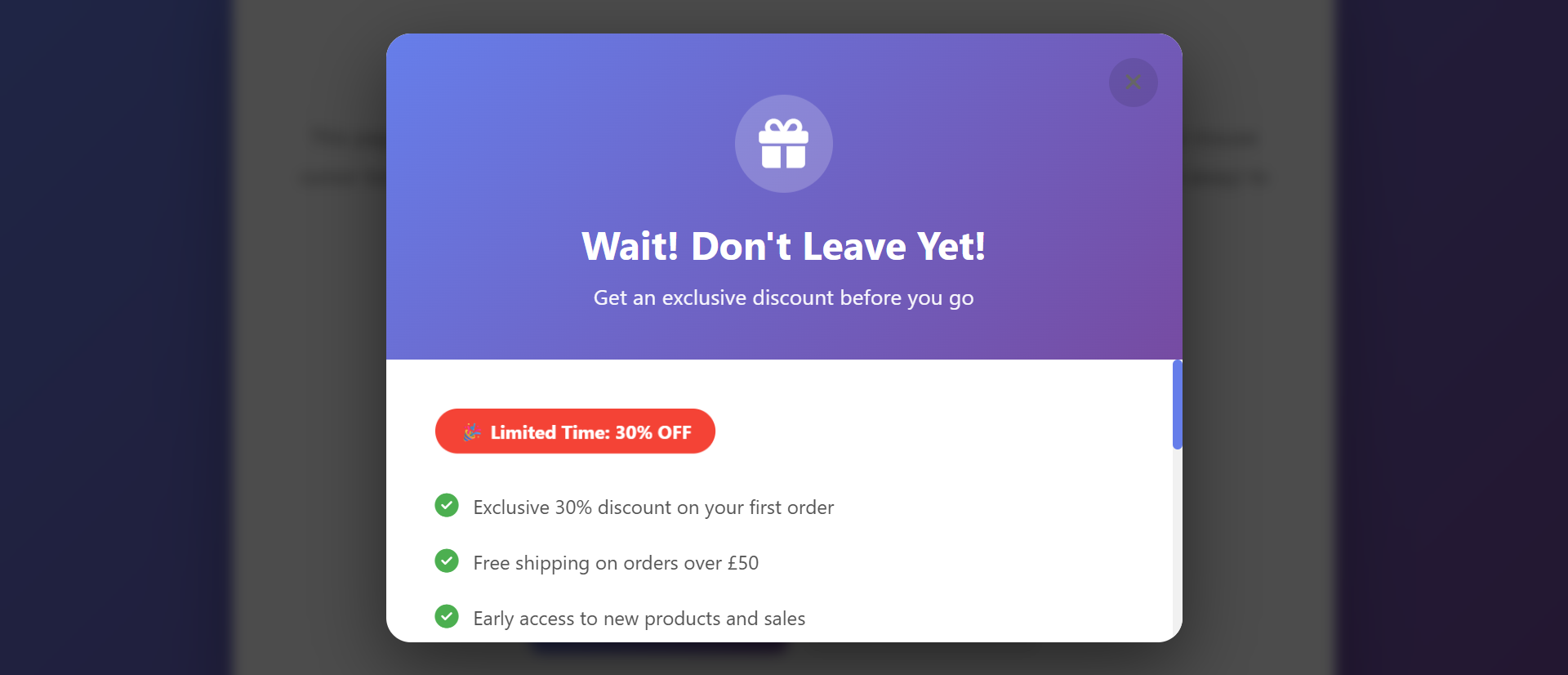
A visitor spends three minutes reading your product page, scrolls to the bottom, then moves their cursor toward the browser's close button. In one second, they'll be gone forever. You spent money getting them here. You created compelling content. But you're about to lose them without even trying to keep them.
This scenario repeats millions of times daily across the web. Research shows 97% of first-time visitors leave websites without converting. Most businesses watch this happen passively, never attempting a final retention effort. Meanwhile, exit-intent popups—triggered by abandonment behavior—recover 23% of abandoning visitors and generate conversion increases of up to 234%.
The problem isn't that visitors leave—that's inevitable. The issue is letting them leave without understanding why or offering a solution. When implemented thoughtfully, exit-intent technology detects abandonment signals and presents targeted offers that address objections, capture emails, or provide value that turns exits into conversions.
Let's explore why silent exits waste traffic, how exit-intent popups work, and how to implement them effectively without annoying users or damaging your brand.
The Cost of Silent Exits: Why Most Sites Lose 97% of Traffic
1. Acquisition Costs Wasted on Single-Visit Losses
The Problem: You pay $2-$50+ per click through paid ads, SEO investment, or content marketing. A visitor arrives, browses for 90 seconds, then leaves. You've gained nothing—no sale, no email, no relationship. The investment is completely lost.
Consider these typical metrics:
- E-commerce cart abandonment: 69.8% (average)
- Landing page bounce rate: 40-60% (typical)
- First-visit conversion rate: 2-3% (industry average)
- Never-return rate: 70%+ leave and never come back
Every lost visitor represents wasted acquisition spend and missed opportunity. A business spending $10,000 monthly on traffic that converts at 2% could potentially double conversions by recovering just a fraction of abandoning visitors.
2. Unknown Objections Remain Unaddressed
Why do visitors leave? Without exit-intent technology, you'll never know:
- Price too high? (Offer discount or payment plan)
- Not ready to buy? (Capture email for nurture sequence)
- Missing information? (Link to FAQ or product details)
- Shipping concerns? (Highlight free shipping threshold)
- Trust issues? (Show testimonials or guarantees)
- Just browsing? (Offer content upgrade or newsletter)
Silent exits provide zero feedback. Exit-intent popups allow you to test hypotheses about abandonment reasons and address common objections automatically.
3. No Second Chance to Re-Engage
Once a visitor closes their browser without converting or providing contact information, you have virtually no way to reach them again:
- No retargeting possible without cookies (increasingly limited by privacy changes)
- No email follow-up without an address
- No relationship built for future sales
- Competitor advantage as they search elsewhere next
The exit moment is your last opportunity to establish any future connection.
4. Mobile Exits Are Even More Costly
Mobile users abandon at higher rates due to:
- Smaller screens making content harder to consume
- Distractions (notifications, calls, messages)
- Slower connections creating impatience
- Difficulty with form completion on small keyboards
Since mobile represents 60%+ of traffic for most sites, mobile abandonment directly impacts bottom-line revenue. Exit-intent on mobile (typically triggered by back-button behavior) offers a final retention opportunity.
💡 The Real Cost of Silent Exits
Sites without exit-intent popups lose:
- 97% of first-time visitors without any conversion or contact
- $47 average cart value per abandonment (e-commerce average)
- 70%+ never return - one chance only, completely missed
- 100% of acquisition cost for abandoned sessions with no capture
- Unknown objections - no data on why visitors leave
How Exit-Intent Popups Recover 23% of Abandoning Visitors
1. Exit-Intent Technology Detects Abandonment Signals
The Solution: Exit-intent technology monitors mouse movement, scroll depth, time on page, and engagement patterns to predict when users are about to leave. Key triggers include:
Desktop triggers:
- Mouse cursor moving toward browser close button - Primary signal
- Moving toward back button - Clear exit intention
- Moving toward address bar - Likely searching elsewhere
- Moving toward tabs - Switching away from your site
- Rapid upward movement - Frustration or completion signals
Mobile triggers:
- Back-button press - Clearest mobile exit signal
- Time-based triggers - After X seconds of inactivity
- Scroll depth completion - Reached end of page without action
- Navigation to external link - About to leave domain
When exit intent is detected, a targeted popup appears with one final offer or message before the visitor departs.
2. Contextual Offers Address Specific Abandonment Reasons
Effective exit popups aren't generic—they're targeted based on visitor behavior:
Shopping cart abandonment:
- "Wait! Get 10% off your order" (discount incentive)
- "Free shipping on orders over $50" (removing cost objection)
- "Questions? Chat with us now" (addressing uncertainty)
Content/blog visitors:
- "Download our free guide before you go" (content upgrade)
- "Join 10,000 subscribers getting weekly tips" (newsletter signup)
- "Get this article as a PDF" (value exchange for email)
Service/product pages:
- "Not ready yet? Schedule a free consultation" (low-commitment next step)
- "Get a personalized quote in 60 seconds" (addressing price uncertainty)
- "See what customers say about us" (building trust)
Pricing page abandonment:
- "Need a custom plan? Let's talk" (flexibility signal)
- "Try free for 14 days—no credit card needed" (removing risk)
- "Compare plans side-by-side" (clarity assistance)
3. Value Exchange vs. Desperation
High-converting exit popups focus on providing value rather than desperate pleading:
Low-value approach (converts poorly):
- "Wait, don't go!"
- "Are you sure you want to leave?"
- "You're missing out!"
High-value approach (converts well):
- "Before you go, grab our free [specific tool/guide]"
- "Save 15% with code SAVE15—expires in 10 minutes"
- "Get personalized recommendations based on your browsing"
The best exit popups make visitors feel they're gaining something worthwhile, not being manipulated into staying.
4. Email Capture Creates Future Opportunities
Even if visitors don't convert immediately, capturing their email enables:
- Abandoned cart recovery sequences - Multiple touchpoints to complete purchase
- Educational nurture campaigns - Building trust over time
- Product launch announcements - Bringing them back for new offerings
- Retargeting synchronization - Coordinated email + ad campaigns
- Customer research - Surveying why they didn't convert
A visitor who leaves with nothing provides no future value. A visitor who leaves with their email on your list has ongoing potential.
5. A/B Testing Reveals What Works
Exit-intent popups are highly testable:
- Offer variations - 10% discount vs. free shipping vs. bonus item
- Headline tests - Benefit-focused vs. curiosity-driven vs. urgency-based
- Design tests - Minimal vs. image-rich vs. video-based
- Timing tests - Immediate exit detection vs. delayed trigger
- Targeting tests - Different popups for different pages/audiences
Continuous optimization can improve recovery rates from 10% to 30%+ over time.
📊 Exit-Intent Popup Performance Metrics
Well-implemented exit-intent popups achieve:
- 23% visitor recovery rate - Nearly 1 in 4 abandoners converted or captured
- 234% conversion increase - Compared to no exit-intent system
- 15-20% email capture rate - From visitors who would have left with no contact
- $4.50 average value per popup view - Accounting for conversions and future email value
- 600%+ ROI - Exit-intent tools cost $20-100/month with massive returns
Essential Exit-Intent Popup Features
1. Smart Triggering Technology
- True exit detection - Cursor movement toward browser chrome, not just scrolling
- Mobile back-button detection - Capturing mobile exit intent effectively
- Frequency capping - Not showing same popup repeatedly (once per session or visitor)
- Cookie-based memory - Remembering who's already seen/dismissed popups
- Time delay options - Not triggering instantly (minimum engagement time required)
2. Behavioral Targeting Capabilities
- Page-specific triggers - Different popups for cart, pricing, blog, etc.
- Traffic source targeting - Unique offers for paid ads vs. organic vs. referral traffic
- Cart value triggers - Higher discounts for larger abandoned carts
- Device targeting - Mobile-optimized vs. desktop experiences
- New vs. returning visitors - Different strategies for each group
- Geographic targeting - Location-specific offers or shipping info
3. User-Friendly Design Elements
- Clear close button - Easy to dismiss (builds trust, reduces annoyance)
- Concise copy - 1-2 sentence headline, brief explanation, clear CTA
- Minimal form fields - Email only for signups (name optional)
- Visual hierarchy - Primary action obvious, secondary close option subtle but accessible
- Mobile responsiveness - Perfect rendering on all screen sizes
4. Conversion Optimization Features
- Social proof - "Join 15,000 subscribers" or customer count
- Urgency elements - Countdown timers for limited offers
- Visual appeal - Product images, hero shots, or illustrations
- Benefit-focused copy - "What you'll get" not "what we want"
- Trust signals - No spam policy, unsubscribe info, privacy assurance
5. Analytics and Testing Tools
- View tracking - How many times popup displays
- Conversion tracking - Popup-driven signups, sales, downloads
- A/B testing built-in - Easy headline, offer, and design variations
- Segment analysis - Performance by traffic source, device, page
- Revenue attribution - Tracking popup-captured emails to eventual sales
Implementation Best Practices
1. Start with High-Intent Pages
Don't add exit-intent to every page immediately. Prioritize:
- Shopping cart pages - Highest-value abandonment to prevent
- Pricing pages - Decision point where objections arise
- Product detail pages - Interest demonstrated, conversion possible
- Long-form content - Engaged readers worth capturing for email list
- Thank you pages - Actually DON'T use exit here (goal achieved)
2. Match Offer to Abandonment Context
Generic "Subscribe to our newsletter" popups convert at 5-8%. Contextual offers convert at 15-25%:
Context-aware examples:
- Cart with $200 worth of products → "Get 10% off your $200+ order"
- Pricing page visitor → "See a live demo before you decide"
- Blog article reader → "Download the complete guide to [article topic]"
- Service page browser → "Get a free audit/consultation/quote"
3. Test Incentive Levels
Don't automatically offer your maximum discount:
- Start conservative - 10% discount or free shipping test
- Test incrementally - Does 15% convert significantly more than 10%?
- Consider non-monetary incentives - Extended trials, bonus content, faster shipping
- Segment by cart value - Higher incentive for larger carts only
- Monitor profit impact - 20% more conversions at 15% discount may reduce profit vs. 15% more at 10% off
4. Respect User Experience
Exit-intent should feel helpful, not manipulative:
- One popup per session maximum - Don't bombard repeat dismissals
- Easy close button - Large, obvious X in corner
- No fake close buttons - All Xs should actually close (dark patterns destroy trust)
- Respect "no thanks" - If dismissed, honor it (set cookie)
- Lightning-fast load - Popup should appear instantly, not delay exit
- No audio/video autoplay - Silent popups only
5. Mobile-Specific Considerations
Mobile exit-intent requires different approaches:
- Back-button trigger primary - Most reliable mobile exit signal
- Compact design - Popup shouldn't dominate entire screen
- Large tap targets - 44x44px minimum for close button
- Minimal form fields - Email only, no name/phone on mobile
- Fast rendering - Mobile connections slower, optimize images/code
6. Comply with Regulations
Exit-intent popups must respect privacy laws:
- GDPR compliance - Explicit consent for email collection, clear privacy policy link
- CAN-SPAM compliance - Unsubscribe link in all emails, honor opt-outs
- CCPA considerations - Privacy policy accessible, data usage transparent
- Accessibility requirements - Keyboard navigable, screen reader compatible
Advanced Exit-Intent Strategies
1. Multi-Step Exit Popups
Instead of one-time offers, use progressive engagement:
- Step 1: "Wait! We'll give you 10% off"
- If dismissed: Set cookie, don't re-show immediately
- Next visit: Different angle - "Get free shipping instead"
- Third visit: Final approach - "Join VIP list for early access to sales"
2. Survey-Based Exit Popups
Ask why they're leaving instead of just offering incentives:
- "Quick question: What's preventing you from purchasing today?"
- Multiple choice: Price, Not ready, Need more info, Shipping cost, Other
- Follow-up based on answer (price objection → discount, info needed → FAQ link)
- Collect valuable data on abandonment reasons
3. Gamified Exit Popups
Spin-to-win wheels and scratch-off discounts:
- Engages curiosity ("What will I win?")
- Perceived value higher than static discounts
- Converts 20-30% better than standard popups
- Captures emails before revealing prize
4. Cart-Specific Strategies
For e-commerce cart abandonment specifically:
- Free shipping threshold - "Add $12 more for free shipping"
- Abandoned cart emails - Capture email in exit popup, send recovery sequence
- Stock scarcity - "Only 3 left—complete order before they're gone"
- Time-limited discount - "10% off if you complete order in next 15 minutes"
Ready to Recover Abandoning Visitors?
At Exmoor Web Design, we implement exit-intent systems that recover 23%+ of abandoning visitors without damaging user experience. Our strategies combine behavioral targeting, value-focused offers, and continuous optimization.
Get an exit-intent conversion audit: Contact us today
Measuring Exit-Intent Success
Track these metrics to optimize performance:
Key Performance Indicators
- Display rate - Popups shown / total exit events (should be 80%+ if working correctly)
- Conversion rate - Popup conversions / popups displayed (15-25% is good)
- Revenue attribution - Direct sales from popup offers
- Email capture rate - Emails collected / popups displayed (10-20% typical)
- Downstream value - Eventual conversions from captured emails
- Bounce rate impact - Did popups reduce overall bounce? (Should remain neutral or improve)
Optimization Opportunities
- Low display rate? → Exit detection not working properly (technical issue)
- Low conversion rate? → Offer not compelling enough (test better incentives)
- High dismiss rate? → Popup annoying or poorly timed (adjust triggers)
- Mobile underperforming? → Design not mobile-optimized (simplify)
- Certain pages converting poorly? → Wrong offer for context (segment better)
Common Exit-Intent Mistakes to Avoid
1. Showing Popups Too Quickly
Mistake: Popup appears 3 seconds after page load when cursor moves.
Fix: Require minimum 15-30 seconds on page before exit-intent activates.
2. Generic, Non-Contextual Offers
Mistake: Same "10% off" popup on every page for every visitor.
Fix: Segment by page type, traffic source, and behavior for relevant offers.
3. Aggressive Re-Showing
Mistake: Showing same popup every time user moves cursor to close.
Fix: One popup per session, respect dismissals with cookies.
4. Weak Value Proposition
Mistake: "Don't leave!" or "Are you sure?" with no incentive.
Fix: Lead with specific value - what they'll gain by staying/converting.
5. Complex Forms
Mistake: Asking for name, email, phone, company, role in exit popup.
Fix: Email only (maybe first name optional). Minimize friction.
6. No Mobile Strategy
Mistake: Desktop exit-intent only, ignoring 60% mobile traffic.
Fix: Implement back-button and time-based mobile triggers.
7. Ignoring the Data
Mistake: Set up exit popup once, never review performance.
Fix: Weekly/monthly analysis, continuous A/B testing, regular optimization.
Conclusion: Make Every Exit Count
97% of first-time visitors leave without converting. That's not a problem—it's reality. The problem is letting them leave without any attempt to retain them or capture future contact.
Exit-intent popups aren't about desperation or manipulation. When implemented thoughtfully, they're about offering value at the moment of departure—a final discount, a helpful resource, a compelling reason to reconsider. They transform silent exits into opportunities: immediate conversions, email captures for future marketing, or feedback on why prospects didn't convert.
The data is compelling: 23% visitor recovery, 234% conversion increases, 600%+ ROI on implementation costs. But success requires strategy, not just installation. Context-aware offers, user-friendly design, behavioral targeting, mobile optimization, and continuous testing separate high-performing exit-intent systems from annoying popups that damage brands.
Every visitor who leaves your site represents investment—in acquisition, content, product development. Exit-intent technology ensures that investment isn't completely lost. Whether you capture their email, earn a conversion, or simply learn why they left, you've gained something instead of nothing.
Don't let 97% of your traffic silently disappear. Give them a reason to stay—or at least a way to return.
See Exit Intent Popup in Action
Experience how this module can enhance your website's functionality and user experience.
View Live Demo