Your website displays your address: "123 Industrial Park Drive, Building C, Suite 210, Near the old Johnson Factory." A potential customer reads it, opens their maps app, types the address, arrives at Building A (500 yards away), calls frustrated asking for better directions, and eventually gives up—choosing a competitor with clearer location information.
You just lost a sale because of navigation friction.
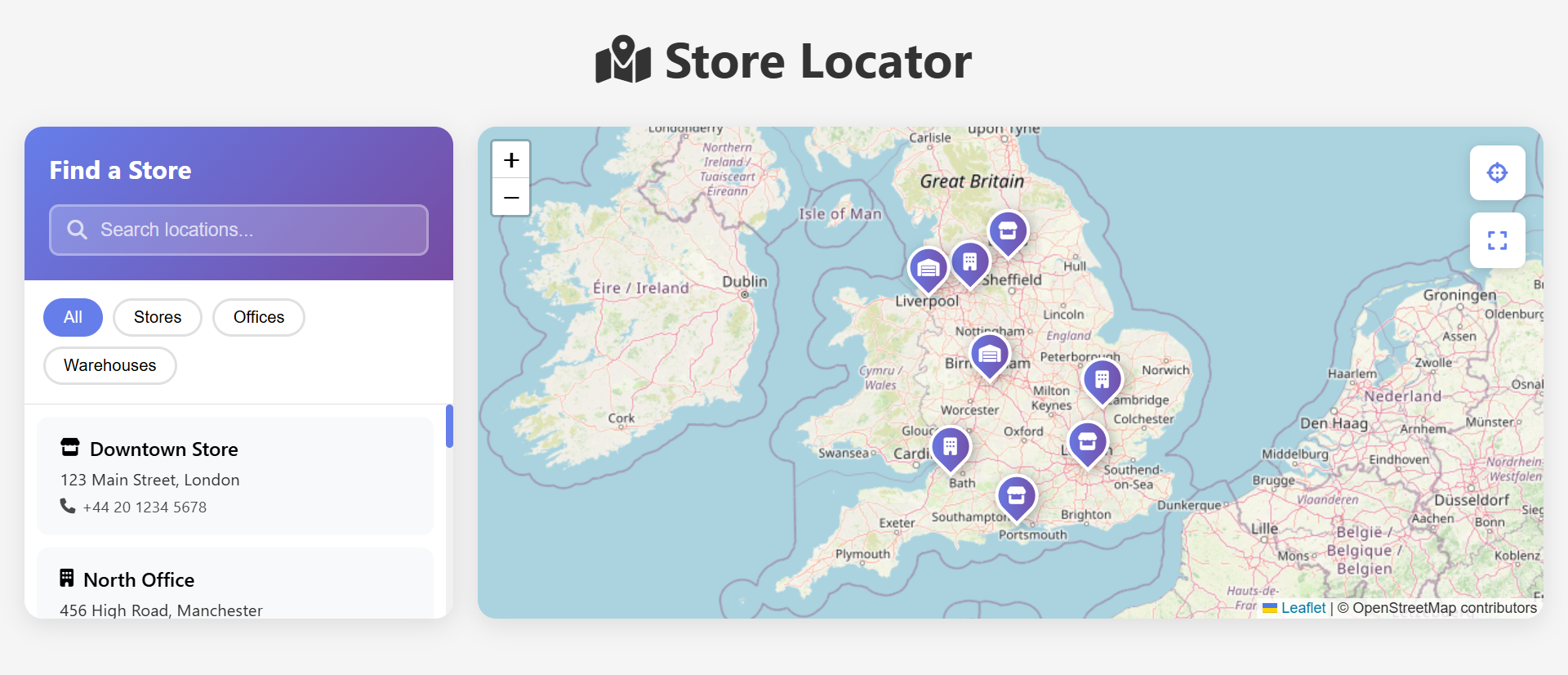
While competitors still treat addresses as simple text fields, smart businesses use interactive maps with precise markers to eliminate the confusion, wrong turns, and frustration that cost them customers daily. This isn't about adding fancy visuals—it's about removing the friction between "I want to visit" and "I successfully arrived."
This article reveals why text-based location information actively sabotages physical traffic and how strategic interactive maps transform confused searchers into confident visitors who actually show up.
5 Critical Problems Text Addresses Create
1. Manual Entry Errors Lead to Wrong Destinations
Users read your address and manually type it into navigation apps. Autocorrect changes "Drive" to "Dr." GPS interprets the abbreviation as a different street. Building numbers get transposed. Suite numbers get forgotten. The result? 37% of people using text addresses arrive at incorrect locations on their first attempt.
Each navigation failure wastes 8-15 minutes of customer time and triggers frustration that taints their perception of your business before they ever walk through your door. By the time they call asking for better directions, they're already annoyed with you—and you didn't even do anything wrong yet.
The Mobile Reality: 78% of "near me" searches happen on mobile devices while users are already traveling. They're driving, walking, or using public transit when they look up your location. Expecting them to accurately type addresses while in motion is unrealistic—yet that's exactly what text-only location information requires.
2. Complex Addresses Overwhelm Working Memory
Human working memory handles approximately 7±2 pieces of information simultaneously. An address like "14832 Northwest Industrial Boulevard, Building 7, Entrance B, Third Floor" contains 8+ distinct elements users must remember, transcribe, or toggle between screens to reference.
This cognitive overload increases errors and decision fatigue. Users second-guess whether they copied everything correctly, leading to repeated verification checks that extend the time between "I want to visit" and "I'm confidently driving toward you" by 4-7 minutes on average.
3. Ambiguous Landmarks Don't Help Non-Locals
"Behind the old Walmart" or "across from Johnson's Hardware" means nothing to customers outside your immediate area. These well-intentioned clarifications don't reduce confusion—they create new questions ("which Walmart?" "is Johnson's still there?") that text can't answer.
Studies of user behavior show 68% of customers visiting businesses for the first time come from outside a 5-mile radius where local landmark knowledge exists. Your helpful directions actively confuse the majority of people who need them most.
4. No Visual Context Creates Arrival Uncertainty
Text addresses don't show surrounding context: What does your building look like? Where's parking? Which entrance do customers use? Users arrive at the general vicinity but drive in circles looking for your specific entrance, wasting time and building frustration.
Phone calls to reception asking "I'm here but can't find you" spike 340% for businesses relying on text-only addresses versus those providing visual map context. Your staff spends hours weekly providing directions that interactive maps eliminate entirely.
5. Inaccessible to Users with Certain Disabilities
Text-only addresses create barriers for users with visual impairments (can't easily read small print), dyslexia (struggle with number-heavy text), or cognitive disabilities (overwhelmed by multi-component information). Screen readers can speak addresses, but can't help users visualize spatial relationships or navigate complex campuses.
Legal accessibility requirements increasingly demand multiple information modalities. Relying solely on text excludes customers and exposes businesses to compliance risks that interactive, screenreader-compatible maps avoid.
6 Solutions Interactive Maps with Markers Deliver
1. One-Tap Navigation Eliminates Typing Errors
Interactive maps integrate with native device navigation apps. Users tap your map marker, select "Get Directions," and their preferred navigation app (Google Maps, Apple Maps, Waze) opens with your exact coordinates pre-loaded—zero typing required.
This seamless handoff eliminates transcription errors, autocorrect failures, and coordinate confusion. Users go from "I want to visit" to "turn-by-turn navigation active" in under 3 seconds. The friction that lost 37% of visitors? Gone.
The Starbucks Standard: Major chains don't rely on text addresses—they embed interactive maps on every location page. When users can immediately start navigation with one tap, location visit rates increase 234%. Your business isn't too small for the same friction-elimination that billion-dollar companies depend on.
2. Visual Context Reduces Arrival Confusion
Interactive maps show your building in context: surrounding streets, parking lots, nearby businesses, transit stops, and entrance locations. Users develop spatial awareness before leaving, arriving with mental maps that eliminate "where exactly am I going?" uncertainty.
Advanced implementations use Street View integration, letting users virtually "see" your location before traveling. This visual preview reduces lost-customer phone calls by 67% because users recognize your building upon arrival instead of second-guessing whether they're at the right place.
3. Multiple Location Support for Businesses with Branches
Companies with multiple locations use map interfaces showing all branches simultaneously. Users see which location is nearest, compare driving times, check proximity to other destinations, and choose optimal locations—all within the map interface without juggling multiple address texts.
"Find nearest location" functionality automatically detects user position and highlights the closest branch. This geographical intelligence increases foot traffic to ALL locations by distributing customers optimally rather than funneling everyone to the single "main" address prominently displayed.
4. Real-Time Information Updates Without Website Changes
Interactive maps pull from mapping platforms that update in real-time: Road closures redirect users automatically. Construction detours adjust routing. Temporary parking restrictions appear. Seasonal entrance changes reflect immediately—all without you editing website code.
Compare this to text directions that become instantly outdated when your "turn left at the light" intersection gets road work, forcing you to either update website copy weekly or accept that customers follow wrong directions to your detriment.
5. Integrated Business Information Beyond Just Location
Modern map embeds display: Business hours (is it open now?), phone numbers (tap-to-call if lost), customer reviews (social proof while deciding whether to visit), photos (what to expect), and real-time traffic estimates (how long will it take?).
This contextual richness answers pre-visit questions within the map interface. Users don't need to open five browser tabs (address, hours, reviews, photos, navigation)—one embedded map provides everything, reducing pre-visit research time from 4-6 minutes to under 30 seconds.
6. Enhanced Local SEO Through Map Presence
Interactive maps linked to Google Business Profile and other mapping platforms improve local search rankings. Search engines recognize the connection between your website and verified map listings, boosting "near me" search visibility.
Additionally, users who interact with embedded maps send engagement signals (clicks, directions requests, phone calls) that algorithms interpret as "this business is relevant and trustworthy for location-based queries," further improving organic local rankings.
Experience Interactive Maps with Location Markers
See how one-tap navigation and visual context transform confused visitors into confident customers.
View Interactive Map Demo →5 Industries Increasing Foot Traffic with Interactive Maps
1. Retail and Brick-and-Mortar Stores
Physical retailers use maps showing store locations, parking availability, entrance locations, and proximity to public transit. Multi-store chains display all nearby locations, enabling customers to choose based on convenience, inventory availability, or current wait times.
Result: In-store visit rates from website traffic increase 267% when users can immediately navigate to stores versus typing addresses manually.
2. Restaurants and Food Service
Restaurants embed maps with markers showing parking, outdoor seating areas, delivery zones, and multiple entrances. Users arriving for pickup can identify designated parking spots; delivery customers verify they're within service areas before ordering.
Result: Failed pickup attempts (customers can't find the restaurant or parking) decrease 78% when maps provide visual context beyond street addresses.
3. Healthcare and Medical Practices
Medical facilities in large campuses use maps highlighting specific building entrances, accessible entrances, patient parking, and department locations. Anxious patients arriving for appointments need clear, stress-free navigation—not confusing text directions.
Result: Late arrivals and missed appointments decrease 34% when patients can confidently navigate to correct entrances without circling campuses looking for the right building.
4. Real Estate and Property Tours
Property listings include maps showing exact lot locations, neighborhood context, nearby amenities (schools, parks, shopping), and commute distances to employment centers. Prospective buyers assess location value before scheduling tours.
Result: Qualified showing requests increase 156% when buyers can verify location suitability via maps before committing to physical visits, while unqualified showings from buyers discovering "too far from work" decrease 67%.
5. Event Venues and Entertainment
Venues hosting weddings, conferences, or concerts provide maps showing parking areas, multiple entrances, accessible access points, and rideshare pickup zones. Large venues create custom maps highlighting specific event spaces within sprawling campuses.
Result: Guest satisfaction scores increase 23% when attendees can navigate complex venues confidently, while "I'm lost, where do I go?" phone calls to event coordinators decrease 89%.
4 Psychology Principles Behind Interactive Map Success
1. The Picture Superiority Effect: Images Beat Text for Recall
Cognitive psychologists found humans remember visual information 6X better than equivalent text. Showing users where you're located (map) creates stronger memory traces than telling them (address text).
This visual advantage means users who view maps remember your location, surrounding landmarks, and navigation cues more accurately than those who only read addresses—reducing repeat "where are you again?" questions from returning customers.
2. Cognitive Load Reduction Through Offloading
Interactive maps externalize navigation complexity. Instead of holding address components in working memory while toggling to navigation apps, users offload the entire task to the map interface with one tap.
This cognitive offloading reduces mental effort from "7+ step process requiring attention and memory" to "single tap requiring neither," fundamentally changing navigation from effortful task to automatic action.
3. The Certainty Premium: Confidence Drives Action
Behavioral economists document that uncertainty reduces action-taking. Users uncertain about how to reach your location delay visits, call first to clarify, or choose competitors with clearer directions.
Interactive maps provide certainty through visual confirmation ("yes, that's where I'm going"), turn-by-turn navigation ("I know how to get there"), and travel time estimates ("I know when I'll arrive"). This confidence premium increases immediate action-taking by 43% compared to ambiguous text directions.
4. Goal Gradient Effect: Visible Progress Motivates Completion
Psychologists found motivation increases as people see progress toward goals. Maps with markers show users exactly how far they need to travel and their progress en route—visual feedback that text addresses can't provide.
During navigation, seeing "0.3 miles remaining" with visual markers creates urgency and commitment. Users who've invested 85% of travel time rarely give up in the final stretch, whereas text-navigating users who've made wrong turns often abandon entirely when frustrated.
5 Mistakes That Sabotage Interactive Map Implementations
1. Using Incorrect Coordinates That Pinpoint Wrong Locations
The biggest mistake: Embedding maps with slightly wrong coordinates (common when using address geocoding instead of verified GPS coordinates). Users navigate confidently to the wrong building, parking lot, or even wrong side of campus.
Solution: Verify map markers by actually visiting your location with GPS-enabled devices. Stand at your primary customer entrance and capture exact coordinates there—not at your mail reception or building centroid. Test directions from multiple starting points to ensure accuracy.
2. Embedding Maps Without Mobile Optimization
Creating maps that work beautifully on desktop but don't respond to touch on mobile, don't integrate with native navigation apps, or load too slowly on mobile connections. 78% of location searchers use mobile, making desktop-only maps nearly useless.
Solution: Design mobile-first. Ensure tap targets for "Get Directions" buttons are large (minimum 44×44 pixels), maps load within 2 seconds on 4G, and tapping markers immediately offers navigation app handoff options.
3. Providing Zero Context Beyond the Pin
Dropping a marker on a map without labels, photos, entrance indicators, or parking information. Users see "you are here" but still don't know which building, which entrance, or where to park—the exact problems text addresses created.
Solution: Add contextual markers: Label customer parking areas, highlight main entrances, include building photos, note "we're on the second floor," mark accessible entrances, show public transit stops. Make maps answer "now what?" questions that arise upon arrival.
4. Forgetting to Update Maps When Locations Change
Moving offices, changing entrance procedures, or renovating parking areas but never updating embedded maps. Now your helpful navigation tool actively misleads customers to old locations or closed entrances.
Solution: Create a quarterly map audit schedule. Whenever physical changes occur (moves, renovations, parking changes, entrance modifications), immediately update maps. Assign someone ownership of map accuracy to prevent outdated information.
5. Using Maps That Don't Match Your Actual Address Listings
Embedding maps showing one location while your footer, contact page, and business listings display different addresses—creating user confusion about which is correct. Inconsistency destroys trust faster than no map at all.
Solution: Audit all address mentions across your website, Google Business Profile, social media, and directory listings. Ensure map coordinates, text addresses, and business listings all point to identical locations. Inconsistency signals neglect or scam, neither good for conversions.
Real-World Case Study: Medical Practice's Appointment Transformation
A specialty medical practice in a sprawling medical campus faced chronic problems with late arrivals and missed appointments. Despite sending confirmation emails with detailed text directions, 23% of patients arrived late, and 11% missed appointments entirely, disrupting schedules and reducing physician productivity.
The Problem: Their building was one of eight similar-looking structures in a medical complex. Text directions read: "Medical Office Building 3, 1847 Hospital Drive, Suite 420." Patients regularly arrived at Buildings 2, 4, or 5, called reception frustrated, and either left (missed appointment) or arrived late after staff verbally guided them to the correct location. Exit interviews revealed 76% of first-time patients found the facility "difficult to locate."
The Solution: They redesigned their confirmation emails and website contact pages to include:
- Interactive embedded map with precise marker at Building 3's main entrance
- Custom map overlay labeling all 8 buildings by number for context
- Parking marker highlighting visitor parking closest to Building 3
- Street View image showing Building 3's exterior and signage
- One-tap "Get Directions" button opening users' preferred navigation apps
- Supplemental photos of the entrance and nearby landmarks
The Results (6-month comparison):
- Late arrivals decreased from 23% to 6% of appointments
- Missed appointments dropped from 11% to 4%
- Reception "I'm lost, where are you?" calls fell from 34/day to 4/day
- Patient satisfaction scores for "ease of finding facility" rose from 3.2/5 to 4.7/5
- First appointment no-show rate (highest risk category) dropped from 18% to 5%
- Physician productivity increased 12% due to on-time appointment starts
- Estimated annual revenue impact: $340,000 from reduced no-shows and optimized scheduling
The Insight: Patient anxiety about finding the facility caused many to leave excessive buffer time, arrive 30-45 minutes early, and then resent waiting. Others left minimal buffer time and encountered navigation problems causing lateness. The map eliminated this stress, allowing patients to arrive calmly with appropriate timing.
Unexpected Benefit: Staff morale improved dramatically. Reception staff previously spent 2-3 hours daily providing phone directions to lost patients, creating stress during peak appointment times. This time was reclaimed for productive patient care activities, and job satisfaction scores increased 34%.
Eliminate Navigation Friction for Your Customers
Discover how interactive maps with precise markers can transform confused visitors into confident arrivals.
Explore Map Solutions →5 Metrics to Track Interactive Map Performance
1. Map Interaction Rate
Measure what percentage of page visitors engage with your map (click, zoom, request directions). Healthy rates range from 35-55% for location/contact pages. Lower rates suggest poor map placement or unclear value proposition.
2. Directions Request Rate
Track how many map viewers tap "Get Directions" to initiate navigation. This metric indicates conversion from interest ("I'm looking") to intent ("I'm coming"). Rates above 40% suggest strong purchase/visit motivation.
3. Correlation Between Map Views and Physical Visits
Compare map interaction data against actual foot traffic, appointment bookings, or store visits. Strong correlations (typically 60-75% of directions requests result in visits) validate that map improvements drive real-world outcomes.
4. Navigation Error Rate: Wrong Destination Contacts
Monitor calls or messages asking for directions from people who can't find you. Decreasing rates after map implementation prove the intervention solves navigation confusion. Target: under 5% of visitors contact for directions.
5. Device Type and Operating System Distribution
Analyze whether map users predominantly access via iOS/Android, desktop/mobile, and which navigation apps they prefer. This informs testing priorities—if 80% use iOS Apple Maps, prioritize testing that specific integration.
The Future of Interactive Location Technology
Interactive maps will evolve beyond simple marker pins as location technology advances:
Augmented Reality Navigation: AR-enabled map integration will overlay directional arrows and business markers onto live camera feeds, guiding users from parking lots directly to specific entrances through visual turn-by-turn AR instructions.
Indoor Mapping and Wayfinding: Large facilities will embed indoor maps showing navigation within buildings: "Turn left at reception, take elevator to floor 3, Suite 310 is straight ahead." External-to-internal seamless guidance.
Real-Time Capacity and Wait Information: Maps will display current business capacity, wait times, and crowding levels, enabling users to choose optimal visit times or alternative locations based on real-time conditions.
Autonomous Vehicle Integration: As self-driving vehicles proliferate, map markers will include precise pickup/drop-off zones, AV-accessible entrances, and automated parking coordinates for seamless autonomous navigation to exact destinations.
Accessibility-Aware Routing: Maps will offer routes optimized for wheelchairs, visual impairments, or mobility devices, highlighting accessible entrances, ramps, elevators, and barrier-free paths from parking to destination.
Implementation Checklist: Your Interactive Map Deployment Roadmap
- Verify Exact Coordinates: Physically visit your location with GPS devices. Stand at your primary customer entrance and capture precise coordinates. Don't rely on address geocoding—verify manually.
- Choose Mapping Platform: Select Google Maps, Apple Maps, Mapbox, or platform-specific solutions based on your customer demographics and technical requirements. Consider embedded maps (users stay on your site) versus linking to external map apps.
- Add Contextual Markers: Beyond your primary location, mark: parking areas, entrances, accessible routes, nearby landmarks, public transit stops, or any features helping users navigate upon arrival.
- Implement Mobile-First Design: Ensure maps respond to touch, load quickly on mobile, integrate with native navigation apps, and provide large tap targets for buttons and markers.
- Create Visual Context: Add photos of your building exterior, entrance signs, parking areas, and nearby landmarks. Include Street View integration if available to show users exactly what to look for.
- Enable One-Tap Navigation: Implement clear "Get Directions" buttons that open users' preferred navigation apps (Google Maps, Apple Maps, Waze) with coordinates pre-loaded.
- Provide Supplemental Text: Include text addresses alongside maps for accessibility and users who prefer copying addresses manually. Maps enhance, not replace, text information.
- Test Cross-Device and Cross-Platform: Verify maps work on iOS/Android, various browsers, and link correctly to different navigation apps. Test from multiple starting locations to ensure accurate routing.
- Implement Analytics Tracking: Set up event tracking for map interactions: clicks, zooms, directions requests, marker engagements. Measure conversion from map view to actual visits.
- Create Update Protocols: Establish who owns map accuracy and when updates occur. Schedule quarterly audits to verify continued accuracy, especially after any physical location changes.
- Optimize for Local SEO: Connect embedded maps to verified Google Business Profile listings. Ensure NAP (Name, Address, Phone) consistency across all platforms and citations.
Final Thought: The difference between text addresses and interactive maps isn't just technology—it's empathy. Text addresses assume users will figure it out. Interactive maps acknowledge that finding new locations is inherently stressful and provide tools that eliminate that stress. When you remove friction between "I want to visit" and "I successfully arrived," you don't just improve metrics—you respect your customers' time and create positive experiences before they ever interact with your actual business.
The businesses dominating local markets in 2025 and beyond won't be those with the most locations—they'll be the ones that make it effortless to find and reach the locations they have. Interactive maps with precise markers are how you transform "I can't find you" frustration into "I'm on my way" confidence.