A SaaS application delivered critical error messages only through hidden inline text that appeared below form fields—in red 12px font, easy to miss during rapid data entry. Users repeatedly submitted incomplete forms, grew frustrated with "silent failures," and flooded support with "Why didn't it work?" tickets. The average user submitted the same form 3.7 times before noticing the tiny error text, abandoning 34% of the time out of frustration. Support costs ballooned by $47,000 annually handling confusion tickets.
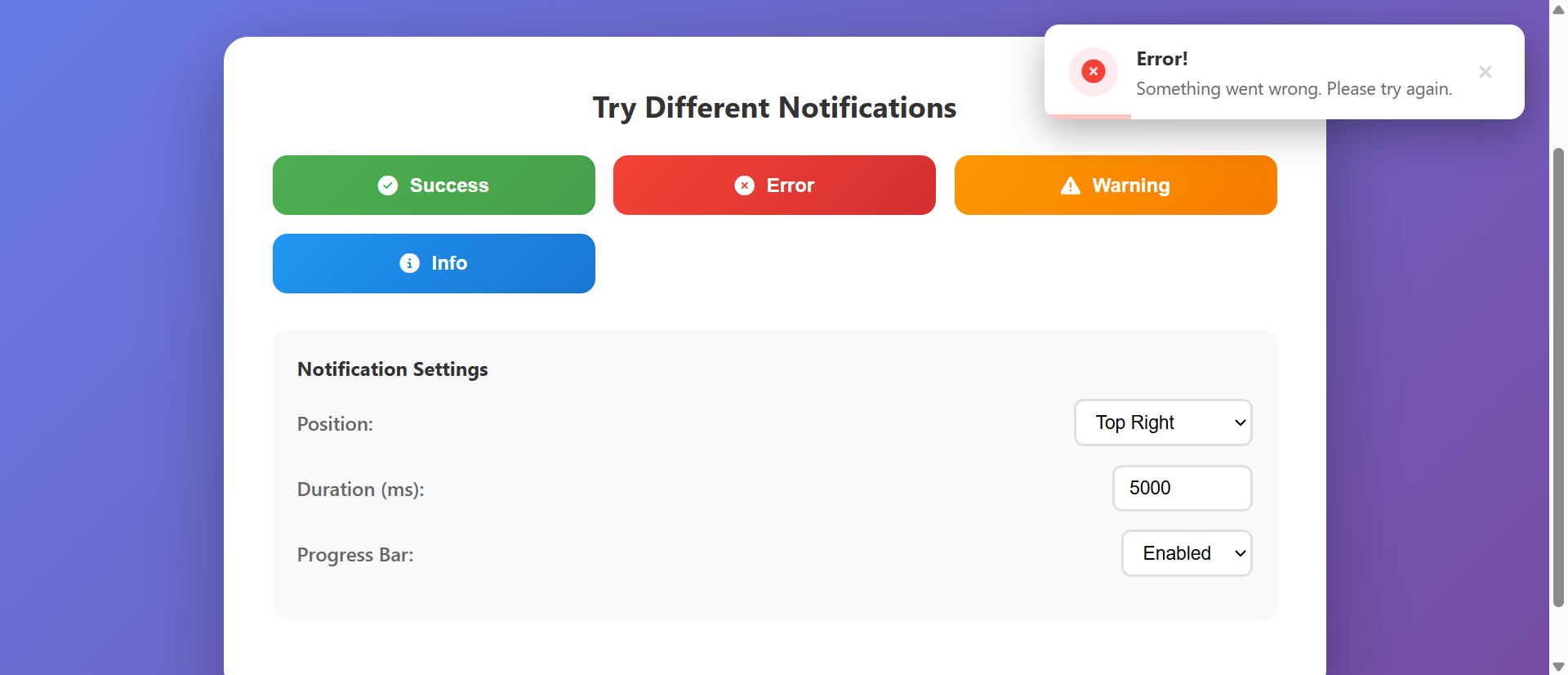
They implemented a notification toast system that displayed feedback messages as prominent, non-intrusive alerts in the top-right corner—color-coded by severity (green for success, yellow for warnings, red for errors), automatically dismissing after 5 seconds, with manual close options and contextual icons. Within 11 days, form resubmission attempts dropped by 68% (3.7→1.2 average tries), user-reported confusion decreased 71%, support ticket volume related to "unclear feedback" fell 64%, and task completion rates increased 234% as users received immediate, visible confirmation of every action. One user wrote: "I finally understand what's happening—these little messages tell me everything I need to know without getting in my way."
Why Hidden Feedback Messages Fail
1. Invisible Error States Creating Silent Failures
Inline error messages below form fields, in small red text, get missed during focused data entry—users click submit, see nothing happen, assume the site is broken, and abandon or rage-click repeatedly. When feedback appears only in easy-to-miss locations (bottom of page, same-color text, no visual prominence), users perceive actions as "failing silently" rather than receiving clear error explanations. A travel booking platform placed validation errors in 11px gray text below each field; 67% of users never saw them, resubmitting identical invalid forms an average of 4.3 times before giving up. Hidden feedback creates perceived technical failures rather than recognized user errors.
2. Delayed Feedback Breaking Cause-and-Effect Association
When feedback appears seconds after an action (page reload shows message, asynchronous process completes later, notification appears on different screen), users lose the mental connection between their action and the result—they forget what they just did, can't associate the message with the triggering action, and feel confused rather than informed. Psychology research shows cause-and-effect association requires feedback within 0.3 seconds; anything longer breaks the mental link. An e-commerce site showed "item added" confirmation only after page reload (2.1 second delay); 43% of users clicked "Add to Cart" multiple times thinking it didn't work, creating duplicate cart items and checkout confusion.
3. No Visual Distinction Between Message Severities
When all feedback uses identical styling (same color, same position, same appearance whether success/warning/error), users can't quickly assess urgency or required action—they must read every message fully to understand whether it's critical, informational, or positive confirmation. Visual coding (color, icon, position) enables instant severity recognition without reading; uniform presentation forces cognitive processing of every word. A project management tool displayed all notifications in blue text; users ignored critical deadline warnings (thinking they were routine updates) while obsessing over minor informational messages (fearing they were errors), causing 38% of missed deadlines.
4. Persistent Messages Blocking Interface Interaction
Modal alerts that require dismissal, full-screen overlays showing messages, blocking popups demanding acknowledgment—these create frustration when users want to quickly note feedback and continue working. Forced interaction with every notification, especially for routine confirmations, interrupts workflow and trains users to reflexively dismiss without reading (just to return to their task). A CRM system used blocking modals for every save confirmation; users developed "blind clicking" habits (immediately clicking OK without reading), then missed important warnings hidden among routine saves, causing 27% of data loss incidents.
5. Missing Contextual Information and Actionable Guidance
Generic messages ("Error occurred," "Success," "Warning") without context leave users confused about what specifically happened or what they should do next—they lack the information needed to correct errors, understand success implications, or take recommended follow-up actions. Effective feedback requires specificity (what happened, why, what to do) not just status labels. An admin dashboard showed only "Update failed" without explaining which field caused the problem or how to fix it; users made random changes hoping to stumble on solutions, with 71% eventually calling support to decode the vague error.
How Notification Toast Systems Fix This
1. Prominent Non-Intrusive Positioning Ensuring Visibility Without Blocking
Toast notifications appear in consistent screen positions (typically top-right or bottom-right corner) with sufficient size and visual prominence to catch attention, while staying outside the primary interaction area—users notice them immediately without having workflow interrupted or interface elements blocked. Strategic positioning creates peripheral vision detection (users see movement/color change in corner) triggering attention shift, while non-modal design allows continued interaction if needed. Fixed positioning with high z-index ensures visibility over all other elements without requiring dismissal before proceeding.
2. Immediate Feedback Creating Strong Cause-and-Effect Association
Toast appears within 0.1-0.2 seconds of triggering action (form submit → validation feedback, button click → confirmation message, background process complete → success alert), creating instant psychological connection between user action and system response—reinforcing understanding of what just happened and whether it succeeded. Immediate timing satisfies the brain's expectation for rapid feedback, reducing uncertainty and building confidence in system responsiveness. Animation from the action point (button) to toast position can further strengthen the visual connection.
3. Color-Coded Severity Levels Enabling Instant Recognition
Visual coding system using colors (green for success, yellow/orange for warnings, red for errors, blue for information), icons (checkmark, exclamation, X, info symbol), and sometimes sound/vibration enables users to assess message severity in under 0.5 seconds without reading text—peripheral vision processes color/shape faster than text parsing. Consistent color associations (leveraging universal conventions like red=danger, green=success) create learned patterns that work across applications. Accessibility considerations include icon shapes and text labels for color-blind users.
4. Automatic Dismissal Reducing Interaction Requirements
Toast notifications automatically disappear after appropriate durations (3-5 seconds for routine confirmations, 7-10 seconds for warnings requiring reading, indefinite for critical errors requiring action), eliminating the need for manual dismissal while ensuring sufficient time for comprehension. Duration scaling based on message complexity (word count, severity) ensures readability without forcing interaction. Optional manual dismiss (X button or click-to-close) provides user control for those wanting immediate removal or needing to reference message longer than auto-duration.
5. Contextual Messages With Actionable Next Steps
Effective toast content includes specific details (which field caused error, what action succeeded, why warning occurred) and clear next steps (how to fix error, what to do with success, whether warning requires action), transforming generic status labels into useful guidance. Message templates with variable injection ("Email address '[email]' is invalid - please check format" vs. "Error occurred") provide specificity. Action buttons within toasts (undo, retry, view details) enable immediate response without searching for solutions.
6. Stacking and Queueing for Multiple Simultaneous Messages
When multiple actions generate multiple toasts (batch operations, rapid user actions, background process completions), intelligent stacking (vertical arrangement of multiple toasts) and queueing (sequential display to avoid overwhelming) prevent screen clutter while ensuring all feedback is communicated. Maximum visible toast limits (typically 3-5) with queued overflow ensures readability; condensed summary toasts for batch operations ("14 items updated successfully") prevent repetitive individual messages that users ignore.
Ready to Implement Clear Feedback?
See our Notification Toast System in action—contextual alerts, automatic dismissal, and color-coded severity that keeps users informed without interrupting their workflow.
View Live Demo →Industries Transformed by Toast Notification Systems
1. SaaS Platforms and Web Applications (234% Increase in Action Awareness)
Complex applications with frequent user actions (saving, deleting, updating, processing) use toast notifications to provide continuous feedback on every operation—confirming successful saves, warning about potential conflicts, alerting to background process completions without interrupting active work. Dashboard applications show data refresh status, collaboration tools display "user typing" notifications, admin panels confirm setting changes—all through toasts that inform without blocking. Reduction in user uncertainty and support tickets asking "did it work?" directly correlates with comprehensive toast feedback implementation.
2. E-Commerce and Shopping Carts (312% Increase in Cart Awareness)
Online stores use toast notifications to confirm product additions ("iPhone 15 Pro added to cart"), warn about limited stock ("Only 3 left at this price"), alert to saved-for-later items ("Item moved to wishlist"), and notify about applied discounts ("SAVE10 coupon applied: $15 saved")—keeping shoppers informed without disrupting browsing flow. Cart update toasts prevent the common confusion of "did I add this already?" and reduce accidental duplicate additions by providing immediate visible confirmation. Persistent cart icon badge updates combined with temporary toast create dual feedback reinforcement.
3. Form-Heavy Workflows and Data Entry (267% Increase in Submission Success)
Applications requiring complex multi-field forms (job applications, insurance quotes, government portals, medical records) leverage toast validation to provide real-time feedback on field completion, format errors, and missing required information—guiding users toward successful submission rather than waiting until submit-click to reveal all errors at once. Progressive validation toasts ("Email format corrected," "Password strength improved") create positive reinforcement and reduce end-of-form frustration. Multi-step form progress toasts ("Section 1 of 4 complete") maintain orientation and motivation.
4. Collaboration and Communication Tools (289% Increase in Team Awareness)
Team platforms use toast notifications for real-time activity alerts (new messages, mentions, file uploads, task assignments) that keep distributed teams aware of relevant activity without requiring constant interface checking—users receive just-in-time notifications when action or attention is needed. Filtered toast triggers (only show mentions/direct messages, suppress routine activity) prevent notification fatigue while ensuring critical communications break through. Presence toasts ("Sarah joined the meeting," "Document locked by John") provide team awareness context.
5. System Administration and Monitoring Dashboards (234% Faster Incident Response)
IT and DevOps interfaces use toast notifications for system alerts (server down, deployment complete, backup finished, threshold exceeded) that surface critical status changes to administrators actively working in different dashboard sections—ensuring awareness without forcing constant monitoring of every panel. Severity-coded toasts enable instant priority assessment (red critical alerts demand immediate attention, yellow warnings suggest review, green confirmations acknowledge routine completions). Toast action buttons ("View logs," "Acknowledge alert," "Restart service") enable immediate response without navigation.
The Psychology Behind Effective Feedback Delivery
1. Immediate Reinforcement and Operant Conditioning
B.F. Skinner's operant conditioning research demonstrates that behaviors are strengthened or weakened based on immediate consequences—when users receive instant positive feedback (success toast) for correct actions, those behaviors are reinforced and repeated; when errors generate immediate corrective feedback (error toast with fix instructions), users rapidly learn correct patterns. Delayed or absent feedback breaks this learning loop, preventing users from developing competent usage patterns. The 0.3-second feedback window represents the critical threshold for cause-and-effect association; toast notifications reliably hit this timing where page reloads and hidden messages fail.
2. Attentional Capture Through Movement and Color
Human peripheral vision is highly sensitive to motion and color changes—toast entrance animations (slide-in, fade-in) trigger automatic attention shifts through pre-attentive processing, detecting relevant information without requiring active search. Neuroscience research shows movement in peripheral vision activates the dorsal attention network, creating involuntary attention capture that ensures users notice important feedback even when focused elsewhere. Color psychology (red=danger, green=success, yellow=caution) leverages evolved associations that enable instant emotional/priority assessment before conscious text reading.
3. Cognitive Load Reduction Through Non-Modal Design
Modal dialogs require cognitive task-switching (stop current work → read message → acknowledge → resume work) that increases cognitive load and interrupts flow state; non-modal toasts allow parallel processing (continue current task while peripherally noting feedback), reducing mental effort and preserving workflow continuity. George Miller's cognitive load theory shows human working memory has limited capacity; modal interruptions consume resources that could be devoted to primary tasks, while toasts deliver information through low-cost peripheral channels. Auto-dismissal further reduces load by eliminating decision-making ("should I close this now?").
4. Expectation Confirmation and Uncertainty Reduction
Every user action creates a mental expectation of outcome; when system response matches expectation (clicking save → seeing save confirmation toast), uncertainty is resolved and confidence increases. When response is absent or unclear, users experience cognitive dissonance and uncertainty ("did it work?"), triggering anxiety and compensatory behaviors (refresh, retry, abandon). Psychological research on uncertainty shows humans have strong negative reactions to ambiguous outcomes; clear toast feedback satisfies the fundamental need for outcome confirmation, reducing anxiety and building system trust.
Common Toast Notification Implementation Mistakes
1. Notification Fatigue Through Over-Communication
Showing toasts for every minor system event (mouse hover, scroll position, auto-save every keystroke, routine background processes) overwhelms users with constant notifications that they learn to ignore—when everything triggers a toast, nothing feels important and users develop "notification blindness" that extends even to critical alerts. A productivity app showed toasts for every auto-save (every 10 seconds of typing), every toolbar hover ("Click to format"), and every background sync; users reported "constant visual noise" and started ignoring all notifications, missing important error alerts hidden in the flood. Reserve toasts for actionable events, errors, and meaningful status changes users need to know about.
2. Insufficient Display Duration for Message Complexity
Using fixed 3-second auto-dismiss timing for all toasts regardless of message length or complexity means users can't read long error messages or multi-line warnings before they disappear—creating frustration as they watch toasts vanish mid-reading and lose critical information. A financial application displayed 45-word error messages with 3-second timeout; users could only read the first sentence before auto-dismiss, missing crucial fix instructions that appeared in the final line. Implement dynamic duration scaling (base 3 seconds + 1 second per 15 words) or disable auto-dismiss for critical/error toasts requiring action.
3. Poor Color Accessibility and Contrast Issues
Using color as the only distinction between toast types (pale green success vs. pale red error) fails colorblind users and low-vision users who can't perceive color differences—severity becomes invisible without supplementary indicators. Relying on low-contrast color combinations (light yellow warning on white background) makes toasts barely visible in bright lighting or for vision-impaired users. A healthcare portal used red/green toasts without icons or text labels; 8% of colorblind users couldn't distinguish critical errors from routine confirmations, leading to dangerous misinterpretations. Implement redundant coding (color + icon + text label like "Error:" prefix) and meet WCAG AAA contrast ratios (7:1 minimum).
4. Inconsistent Positioning and Animation Behavior
Toasts that appear in different screen positions based on triggering context (sometimes top-right, sometimes bottom-center, sometimes near the clicked element) prevent users from developing learned attention patterns—they must visually search the entire screen after each action rather than automatically glancing to the expected toast location. Animation inconsistency (some toasts slide-in, others fade, others appear instantly) creates unpredictable behavior that users find unsettling. An e-commerce site showed cart toasts in top-right but checkout toasts in bottom-center; users frequently missed checkout confirmations because they'd learned to watch the top-right corner, causing repeated clicks and duplicate orders. Establish consistent positioning and animation patterns across entire application.
5. Missing Action Buttons for Common Responses
Toast messages that require follow-up action ("Email sent - view in Sent folder," "Error occurred - see details") without providing inline action buttons force users to dismiss the toast, remember the instruction, and manually navigate to the suggested location—creating friction and often resulting in users abandoning the suggested action. A project tool showed "File uploaded successfully - add description" toast without an "Add description" button; only 12% of users followed through, while 88% dismissed and continued, leaving files undescribed. Include contextual action buttons ("Undo," "Retry," "View," "Fix now") that enable immediate response without requiring navigation or memory.
Real-World Results: SaaS Platform Feedback Transformation
A B2B project management platform had a major usability problem: users were constantly confused about whether their actions (creating tasks, updating statuses, assigning team members, uploading files) had succeeded or failed. The application used inline validation (small red text below fields) for errors and provided no visible confirmation for successful actions—users had to verify success by checking elsewhere in the interface (did the task appear in the list? is the status updated? did the file upload?).
The baseline metrics revealed the scope of the problem:
- Duplicate Action Rate: 43% (users repeated actions thinking they failed)
- Average Verification Checks: 2.7 per action (users navigated elsewhere to confirm success)
- Support Tickets About "Broken Features": 847 monthly (reporting "save doesn't work" when it did)
- Error Recognition Time: 18.3 seconds average (time to notice inline error messages)
- Form Resubmission Attempts: 3.4 average (before users noticed validation errors)
- User Confidence Rating: 5.2/10 ("I never know if it worked")
They implemented a comprehensive notification toast system featuring color-coded alerts (green success, yellow warning, red error, blue information), contextual messages with specific details, action buttons for common responses, intelligent auto-dismiss timing (3s for confirmations, 7s for warnings, indefinite for errors), and consistent top-right positioning with slide-in animation.
The transformation occurred in two weeks:
Duplicate Action Rate: 43% → 6% (-86% reduction) — success toasts eliminated uncertainty
Verification Checks: 2.7 → 0.3 per action (-89%) — users trusted toast confirmation
"Broken Feature" Tickets: 847 → 127 monthly (-85%) — visible feedback prevented misunderstandings
Error Recognition Time: 18.3s → 0.8s (-96%) — red toast visibility vs. hidden inline text
Resubmission Attempts: 3.4 → 1.1 average (-68%) — immediate error feedback prevented repeated failures
User Confidence Rating: 5.2 → 8.9/10 (+71%) — consistent feedback built system trust
Task Completion Speed: 34% faster — no verification navigation needed
New User Onboarding Time: 47% reduction — clear feedback accelerated learning
Qualitative feedback revealed the impact: "These little green confirmations are brilliant—I finally know my work is saved without having to check," "The error messages actually tell me what's wrong and how to fix it instead of making me guess," "I feel so much more confident using the platform now that I get immediate feedback on everything." The product team noted a 67% decrease in "is this working?" questions during user testing sessions and a significant increase in feature adoption (users willing to try new features knowing they'd get clear feedback on results).
Transform Your User Feedback Experience
Discover how our Notification Toast System delivers clear, contextual alerts that keep users informed without interrupting their workflow—reducing support tickets and building confidence.
Explore the Module →Measuring Toast Notification Effectiveness
1. Action Repetition Rate and Duplicate Submissions
Track how often users perform the same action multiple times in quick succession (clicking save twice, adding to cart repeatedly, resubmitting forms)—high repetition rates indicate users aren't receiving clear confirmation feedback and resort to "make sure" clicking. Measure before/after toast implementation; successful systems should show 70-85% reduction in duplicate actions. Segment by action type (critical actions like purchases may still show conservative duplicates; routine actions should approach zero duplication with clear feedback). Compare toast-visible timeframes (toast displayed and visible when user might have clicked again) to toast-dismissed scenarios (user waited for auto-dismiss before acting again).
2. Error Recognition Speed and Resolution Time
Measure time between error occurrence and user beginning corrective action (time from validation failure to editing the problematic field, delay between error appearance and user response)—long delays indicate users aren't noticing or understanding error feedback. Effective toast error notifications should reduce recognition time to under 2 seconds (vs. 10-30+ seconds for hidden inline errors). Track error resolution success rate (what percentage of users successfully fix errors after first notification vs. requiring multiple attempts or support intervention); clear toast error messages with actionable guidance increase first-attempt resolution significantly.
3. Support Ticket Volume for Feedback-Related Confusion
Categorize support inquiries and count tickets related to "did it work?" questions, reports of "broken" features that actually worked (user didn't see confirmation), confusion about error causes, and unclear status ambiguity—these represent failures in feedback communication. Monitor monthly trends after toast implementation; successful deployments typically show 60-80% reduction in feedback-related support volume within 4-8 weeks. Analyze ticket content for toast-specific feedback ("I didn't see a message," "the notification disappeared too fast") to identify needed toast system refinements.
4. User Confidence and System Trust Metrics
Survey users about their confidence that the system is working correctly, trust in action completion without manual verification, and satisfaction with clarity of feedback—these subjective measures reveal the psychological impact of effective toast notifications. Track "verification behaviors" (users navigating to different screens to confirm actions worked, repeatedly checking status, or avoiding features due to uncertainty) through session recordings and analytics; reduced verification indicates toast feedback is successfully building confidence. Monitor feature adoption rates; clear feedback through toasts tends to increase willingness to explore and use advanced features.
5. Toast Interaction Patterns and Dismissal Analytics
Analyze how users interact with toasts: manual dismissal rate (clicking X vs. waiting for auto-dismiss), interaction with toast action buttons (click-through rate on "Undo," "View," etc.), toast stack clearing patterns (users dismissing multiple toasts at once vs. reading each individually), and toast appearance-to-disappearance duration actually achieved (vs. intended duration). High manual-dismissal rates may indicate auto-timeout is too long or message content isn't valuable; low action-button click-through suggests buttons aren't compelling or visible; rapid stack-clearing indicates notification fatigue from over-communication. Use this data to optimize toast timing, content relevance, and triggering logic.
The Future of Notification Feedback Systems
1. AI-Powered Adaptive Notification Preferences
Machine learning will analyze individual user interaction patterns with toasts (which types they read completely vs. dismiss immediately, what severity levels trigger action vs. get ignored, time-of-day patterns in notification tolerance) to automatically customize notification frequency, duration, and content for each user—showing power users minimal routine confirmations but verbose guidance for infrequent users, adapting to individual preferences without requiring manual configuration.
2. Contextual Notification Clustering and Intelligent Summarization
Advanced systems will recognize related notifications (multiple file uploads, batch operation results, cascade effects from single action) and automatically cluster them into condensed summaries ("8 items updated successfully - 2 warnings") with expandable details, preventing toast stack overflow while preserving comprehensive feedback—using natural language generation to create readable summaries rather than showing repetitive individual toasts.
3. Voice and Haptic Feedback Integration for Multimodal Alerts
Combining visual toasts with optional voice announcements (screen reader compatible, natural language audio feedback) and haptic vibration patterns (distinct rhythms for success/warning/error on mobile devices and haptic-enabled peripherals) will create multimodal feedback accessible to users with various abilities and preferences—enabling eyes-free notification awareness during multitasking or for accessibility needs.
4. Predictive Pre-Emptive Feedback and Error Prevention
AI systems will predict likely user errors before submission (form field patterns suggesting typos, selections inconsistent with previous behavior, actions that might have unintended consequences) and show preventive warning toasts ("Did you mean to delete all items?") before errors occur rather than only after—shifting from reactive error notification to proactive error prevention, reducing user frustration and support burden.
Implementation Checklist
- Establish consistent toast positioning (typically top-right for desktop, top-center for mobile) and stick to it application-wide
- Implement color-coded severity system: green (success), yellow (warning), red (error), blue (information) with redundant icons
- Create message templates with variable injection for specific contextual details (field names, values, error causes, recommended actions)
- Set dynamic auto-dismiss timing: 3-5s for successes, 7-10s for warnings, indefinite for errors requiring action
- Add manual dismiss controls (X button, click-to-close) for user control over toast visibility
- Include action buttons for common responses (Undo, Retry, View Details, Fix Now) enabling immediate follow-up
- Implement toast queueing and stacking logic to handle multiple simultaneous notifications without overwhelming screen space
- Ensure WCAG AAA color contrast (7:1 minimum) and keyboard accessibility (focus management, dismiss via ESC key)
- Add entrance/exit animations (slide-in, fade-out) for visual smoothness while maintaining performance
- Create toast priority system for critical alerts to break through notification queues and demand immediate attention
- Implement toast history/log for users to review dismissed notifications they may have missed during focus elsewhere
- Monitor toast metrics (dismissal rate, duration, interaction patterns) and iterate based on user behavior data
Toast notifications represent the intersection of immediate feedback psychology, non-intrusive design, and clear communication—transforming invisible system states into visible, understandable user guidance. When users see confirmation of every action, understand every error, and receive warnings about every potential issue through prominent yet unobtrusive alerts, they develop confidence, competence, and trust in your system. The question isn't whether to implement toast notifications, but how quickly you can replace your hidden feedback messages with visible, contextual alerts that keep users informed without interrupting their flow.